why was I having problems using fire fox as my back up browser?

well about a week ago I started using Fire-Fox as my back up browser, then at about 6:30 today I started getting messages, saying every site or even looking up something the sites were insecure because of Mozilla Support was using a invalid certificate. when I switch back every thing started working ok. Can some one look into this problem thanks Stan.
ყველა პასუხი (1)
Hi Stan, when you say
when I switch back every thing started working ok.
Do you mean when you use a different browser everything is okay, which I could understand, or do you mean when you change Firefox to be the Windows default browser everything is okay, which I normally wouldn't expect to change the situation??
Generally speaking, when you get connection errors for many or all secure sites, the problem usually is one of the following:
(1) An error in your system's date, time, or time zone is throwing off certificate validity checks. Sometimes allowing computers to use an internet-based time source can introduce this problem.
(2) A Firefox setting was changed that no longer works with most sites, either by you, by an add-on, or by external software; or
(3) Another program or server is intercepting your requests and substituting a site certificate this is not valid for the site you are trying to load.
For #2, can you think of any recent changes?
For #3, the most common "man-in-the-middle" is not a hacker but your security or parental control software. Products with this feature include Avast, BitDefender, Bullguard, ESET / nod32, and Kaspersky; AVG LinkScanner / SurfShield can cause this error on search sites. Also, on Windows 8.1 and 10, Firefox not being set up to work with the parental control software Microsoft Family Safety.
If you have any of these products: This support article will walk you through checking for this problem: Troubleshoot security error codes on secure websites.
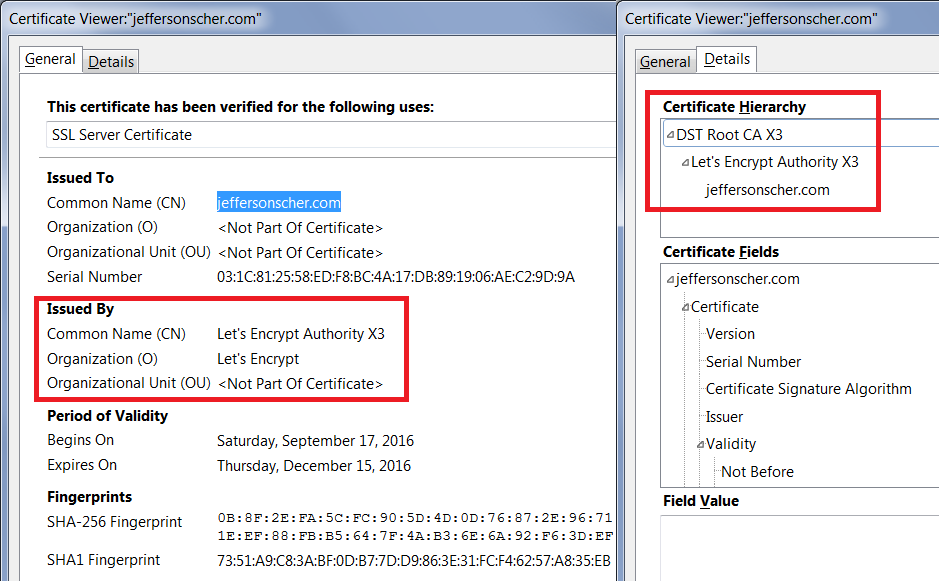
If that doesn't help: You could inspect a sample certificate to see whether that points to the culprit. Here's how:
Load my test page at: https://jeffersonscher.com/res/jstest.php
If you do not get a connection error, stop. The rest of this isn't applicable.
Expand the "Advanced" button on the error page and look for an Add Exception button.
Note: You don't need to complete the process of adding an exception -- I suggest not adding one until we know this isn't a malware issue -- but you can use the dialog to view the information that makes Firefox suspicious.
Click Add Exception, and the certificate exception dialog should open.
Click the View button. If View is not enabled, try the Get Certificate button first.
This should pop up the Certificate Viewer. Look at the "Issued by" section, and on the Details tab, the Certificate Hierarchy. What do you see there? I have attached a screen shot for comparison.