


Our mails through webmail or within the same domain-users (or even through outlook express) go perfectly, however not when we send it directly from Mozilla

I have checked with with the host many times there is no problem visible on their end. We send from webmail server OK, from outlook express OK, but not from Mozilla. I get "confirm security exception" messages from one my pcs, But no error messages for lost/not-received messages.
ყველა პასუხი (20)
Sounds to me like ou have either a rogue anti virus messing with your SSL, or a badly configured server.
That security exception unless confirmed will provent Thunderbird accessing the mail server. But it the server was correctly configured the error message would not come up. It indicates. 1. Someone using a certificate for more than it was purchased for. Very common in poor email/web hosting situations where they have won the race to the bottom in terms of price and quality.
2. Anti virus programs now undertake man in the middle hacking "for your security". Unfortunately the vendors have not spend the millions required to become an internet certifying authority. So the Valid SSL certificate turns to #$%@# on the way through the anti virus.
3. YOu are the victim of a hacking attempt and the error is notifying you that you are connecting to a server different to the one named.
Which it is, will it will be up to you to determine really, I can not test anything with only a .local tld. But you might find using the proper server name with the .com or whatever TLD may fix the issues as the server is identifying itself as example.com and you are connecting to example.local.
I am sure you are totally correct on the above, with the information in hand. The thing is, security exception shows my own mail.xxxx.com domain. And though chosen permanently remember, it keeps popping up. I tried putting in hosting company domain; mail.yyyy.com it then says no need for exception, but can not get to stick in. Is there a menu item under which I can try posting either an exception permanently, cause I really have no problem with it; post a certificate that stays in. I use Eset for antivirus, so that should be alright too. Remarkable issue is I have the same configuration on another device with same antivirus and same Thunderbird set up that runs swift without a problem. A real puzzle here! Appreciate your input.
Sorry, forgot to add that within the same domain all mails go fine, Thank you in advance

I get "confirm security exception" messages
When you get the exception prompt, what error code is shown?
Please see error attached. It never did permanently store the exception. Thx
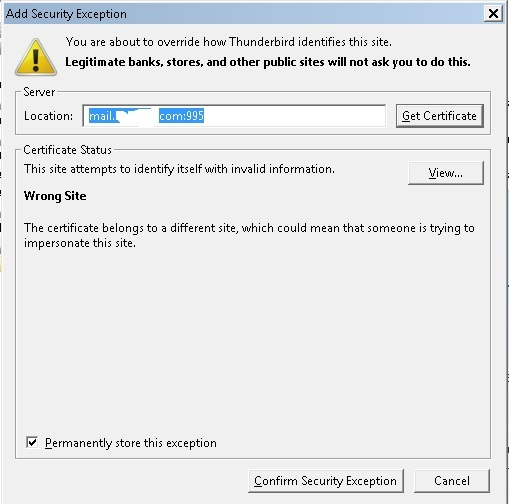
This isn't the pop-up with the error. You're already one step further.
This is all I got; no other errors or messages come up.
Your screenshot already is the step to confirm the security exception. There must be an earlier step to add the security exception. That earlier pop up has the error code.
I could send you the video (mp4) that just two or sometimes three times only this pop-up comes up and that's it. No other prior warning/error is posted on the screen. Unfortunately mp4 is not a supported attachment file type on this/your site. Is there another way to find/see error logs, please let me know. Thx
Clarification: not same pop-up post! It is for different accounts of mine, but not for all of them. Hence I have more than 3 mail accounts.
You can upload a video to a file sharing site of your choice and post a link to it here.
Thank you for suggesting this. >Please see below: https://vimeo.com/187905359
Your link returns an error: Sorry, we couldn’t find that page.
Is it possible to get an email address, so that I can transfer via "wetransfer" through email.
Let's skip over the video thing. Please click the 'View' button in the 'Security Exception' pop up. This should bring up a 'Certificate Viewer' window with the cert details. Please post a screenshot of the 'Certificate Viewer' window, and make sure the 'Issuer' information is visible.
Please see certificate
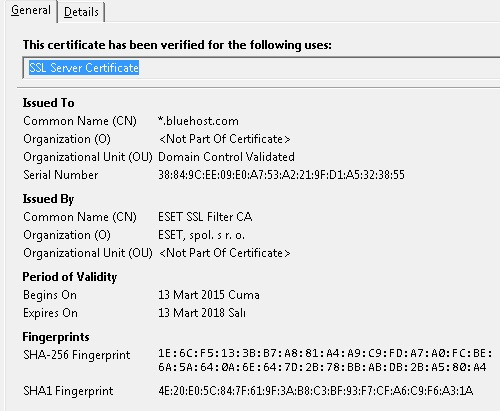
The cert for the bluehost.com server has been created on the fly by your anti-virus software - apparently ESET.
That means ESET is intercepting all secure connections to the server and is talking to the bluehost.com server on behalf of Thunderbird. It means also your email password is visible to ESET, so I'd hope you do have a lot of faith in ESET.
Your options are:
- import the ESET cert into Thunderbird
- don't allow ESET to intercept your secure connections
If you chose the latter see https://support.mozilla.org/en-US/kb/troubleshoot-SEC_ERROR_UNKNOWN_ISSUER#w_eset
Even though the article is for Firefox, it applies to Thunderbird as well.
ჩასწორების თარიღი: , ავტორი: christ1
Thank you for this. I do not have a google account nor password. Nonetheless what if I choose to import Eset cert to Thunderbird. Could you please describe me the risks of that.
I do not have a google account nor password.
My fault - copy and paste error. This is of course your bluehost.com email password.
Nonetheless what if I choose to import Eset cert to Thunderbird. Could you please describe me the risks of that.
As said before, your entire email communication, including your email password, is visible to ESET in the clear, which would otherwise be TLS encrypted. So it really comes down to how much you trust ESET. Also, anti-virus software isn't bug free, and it is running with Administrator permissions, which means a huge potential attack vector.
Interesting... I run ESET nod32 V9
I have no ESET certificates in my certificate store... My Goggle mail is scanned by NOD32.
IS this some sort of corporate edge device sitting in a box on the network that all mail has to come through