


On pogo.com, I accidentally clicked to forbid java. Now I can't play and can't figure out how to remove pogo.com from the forbid list.

I have java add on set to always ask before activating. I accidentally clicked the FORBID button on Pogo.com and now I can't play many of the games. I can't figure out how to remove pogo from the forbid list.
I tried changing java to always allow and it is still not allowing java at pogo. I also run no-script and I disabled it and java is still blocked.
I am running Firefox 36.0.3 on Windows 7 Home Premium with service pack 1.
გადაწყვეტა შერჩეულია
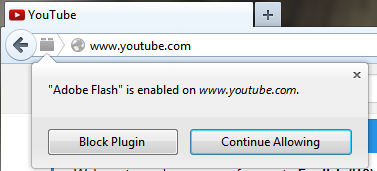
hello SueGale, you'll find a lego-like icon at the left of the address bar when there is plugin content embedded in a page - you can click on that icon to change the permissions for the page.
პასუხის ნახვა სრულად 👍 1ყველა პასუხი (2)
შერჩეული გადაწყვეტა
hello SueGale, you'll find a lego-like icon at the left of the address bar when there is plugin content embedded in a page - you can click on that icon to change the permissions for the page.
HOORAY!!! Thank you so much!! :)