Open
More lines in Title of Thunderbird appointments

Hi, I found an entry in the "thunderbirdmail.de" forum from 2005, where they discuss the option of using userChrome.css for changing the number of lines in the title of an calender appointment.
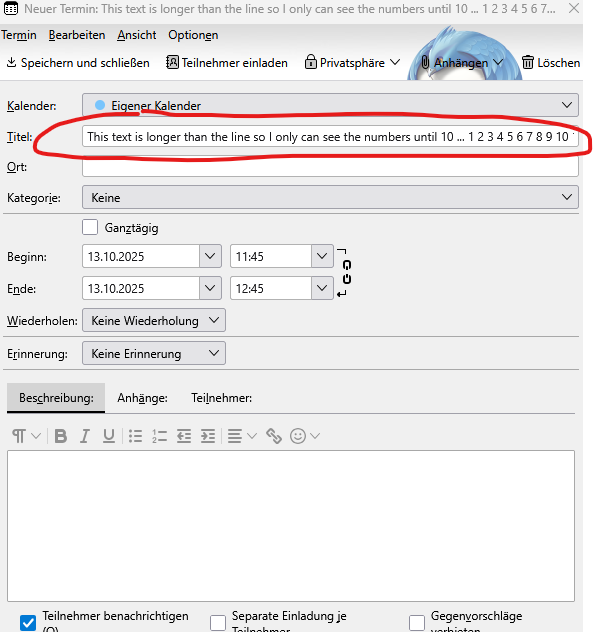
My problem is, that if the text of the title is really long, thunderbird will not enlarge the title window (more lines), so I can see the whole text (as in Outlook - from where I just changed to Thunderbird a few weeks ago).
The entry into the userCrome.css (as suggested in the forum)
.calendar-color-box .event-name-label {
white-space: break-spaces !important;
}
is not working (even I changed the "toolkit.legacyUserProfileCustomizations.stylesheets" to "true").
Can you help me with that issue?
Best reagrds
Gerd Attached screenshots
Hi,
I found an entry in the "thunderbirdmail.de" forum from 2005, where they discuss the option of using userChrome.css for changing the number of lines in the title of an calender appointment.
My problem is, that if the text of the title is really long, thunderbird will not enlarge the title window (more lines), so I can see the whole text (as in Outlook - from where I just changed to Thunderbird a few weeks ago).
The entry into the userCrome.css (as suggested in the forum)
.calendar-color-box .event-name-label {
white-space: break-spaces !important;
}
is not working (even I changed the "toolkit.legacyUserProfileCustomizations.stylesheets" to "true").
Can you help me with that issue?
Best reagrds
Gerd
Attached screenshots