


Join us to show up for other Firefox users 🦊. Earn fun badges and Mozilla swag vouchers! Find out more: https://mzl.la/askafox150

Windows 10 reached EOS (end of support) on October 14, 2025. If you are on Windows 10, see this article.

Mozilla サポートの検索

サポート詐欺に注意してください。 私たちはあなたに通話やショートメッセージの送信、個人情報の共有を求めることはありません。疑わしい行為を見つけたら「迷惑行為を報告」からご報告ください。

詳しく学ぶ

How to delete preference to always store Passkey on device?

  • 返信なし
  • 0 人がこの問題に困っています
  • 10 回表示
  • Open

What happened: 1) I wanted to create a Passkey for a website and store it in Bitwarden. 2) Bitwarden pop-up opened, but while exploring the options, I accidentally clicked on the option "Use your device or hardware key: Always for this website". 3) Windows Defender dialog popped up with the options "iPhone, iPad or Android device" and "Security key" 4) I backed out of the dialog window 5) I clicked the button to create a Passkey again but going forward only the Windows Defender pop-up appears

The problem: I now cannot create a Passkey to store in Bitwarden on a specific website, because I accidentally clicked on "Use your device or hardware key: Always for this website".

What I've tried that didn't work: - looking through Bitwarden settings - deleting Firefox cookies - doing the same thing in Private Browsing - asking AI and looking through about:config, about:preferences and about:logins, as well as trying to find profile files related to webauth

Found workaround: - creating the Passkey from a different Mozilla profile

I would still very much like to be able to undo the "Always for this website". Is there a way to do that? (Attached images were captured later when recreating the situation.)
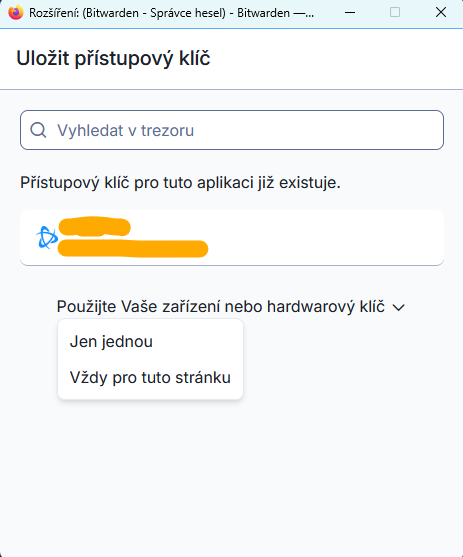
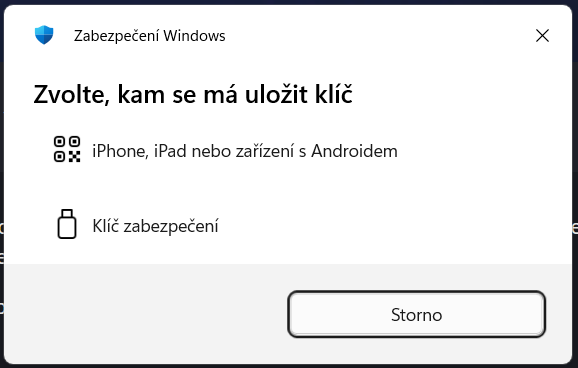
What happened: 1) I wanted to create a Passkey for a website and store it in Bitwarden. 2) Bitwarden pop-up opened, but while exploring the options, I accidentally clicked on the option "Use your device or hardware key: Always for this website". 3) Windows Defender dialog popped up with the options "iPhone, iPad or Android device" and "Security key" 4) I backed out of the dialog window 5) I clicked the button to create a Passkey again but going forward only the Windows Defender pop-up appears The problem: I now cannot create a Passkey to store in Bitwarden on a specific website, because I accidentally clicked on "Use your device or hardware key: Always for this website". What I've tried that didn't work: - looking through Bitwarden settings - deleting Firefox cookies - doing the same thing in Private Browsing - asking AI and looking through about:config, about:preferences and about:logins, as well as trying to find profile files related to webauth Found workaround: - creating the Passkey from a different Mozilla profile I would still very much like to be able to undo the "Always for this website". Is there a way to do that? (Attached images were captured later when recreating the situation.)
添付されたスクリーンショット

投稿に返信するには あなたのアカウントにログイン する必要があります。まだアカウントをお持ちでなければ、新しい質問を開始 してください。