


How do I edit the list of words in the Thunderbird spell-checker?

I have entered "a few" misspelled words in my Thunderbird spell-checker that I want to delete. I looked for them in <en-US.dic> in the Thunderbird folder, but the words are not there, and the date of the file indicates it hasn't been changed in four months. Where is the spell-check list that my Thunderbird uses?
Edeziri site na mach0017

Asịsa Ahọpụtara
Um, I used the toolbar. Or I'd write some text and provoke it to show the spell check dialogue by mistyping something.
A menu is like a thesaurus. There is no absolute right or wrong, You just have to learn the author's system. It's even worse if you flip between operating systems; the menus are noticeably different between Windows, Linux, and OSX.
All Replies (5)
Start a new message. Pull up the spell check. In the dialogue there is an option to edit your personal dictionary.
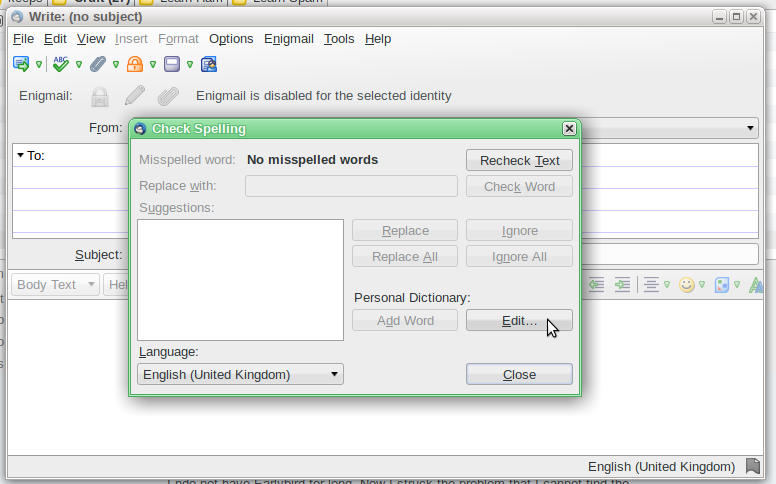
Thanks, that worked. But finding which menu item holds that dialogue box took some experimentation. It would be great if someday the menu drop-down boxes were rearranged to put these things in a more logical place. Seems to me that the spell-checker should be under "Edit" instead of "Options."
Asịsa Ahọpụtara
Um, I used the toolbar. Or I'd write some text and provoke it to show the spell check dialogue by mistyping something.
A menu is like a thesaurus. There is no absolute right or wrong, You just have to learn the author's system. It's even worse if you flip between operating systems; the menus are noticeably different between Windows, Linux, and OSX.
That half-way solved my problem; I still don't know WHERE this super-secret dictionary is kept. Does anyone know?
Look for persdict.dat in your profile. Nothing super secret about it. Just a text file with the words you have added.
Where I would be a little more circumspect is that the official dictionary file can also be edited, but it contains some cryptic annotations concerning how words behave and what modifications to a root word are permissible.
I have guided users to removing words from it, (and have been lambasted for encouraging censorship) but would not care to add words without further analyzing the annotation. OTOH removing words that you might never expect to use, such as, for example, a common mis-typing accident in omitting the 'o' in 'count' seems to me to be perfectly reasonable.