


Windows 10 reached EOS (end of support) on October 14, 2025. If you are on Windows 10, see this article.

Támogatás keresése

Kerülje el a támogatási csalásokat. Sosem kérjük arra, hogy hívjon fel egy telefonszámot vagy osszon meg személyes információkat. Jelentse a gyanús tevékenységeket a „Visszaélés bejelentése” lehetőséggel.

További tudnivalók
A témacsoportot már lezárták és archiválták. Tegyen fel új kérdést, ha segítségre van szüksége.
Zárolva Archivált

How can I add bookmarks on the Firefox phone app?

kFirefoxForum

Hello, I simply need to add bookmarks, but when I select Add on the phone Firefox app, nothing happens?

Phone: iPhone 11 iOS 18.5 Firefox app: Firefox 141.2 (59350)

Here's what I'm doing: Phone -> Firefox app -> 3 horizontal dots (bottom right) -> Add (top right.

I then check for the added bookmark, but find no new bookmark in: Phone -> Firefox app -> 3 horizontal dots (bottom right) -> Bookmarks (top left) -> Star tab is selected by default -> Desktop Bookmarks -> Unsorted Bookmarks -> This folder is empty Bookmarks Toolbar -> my bookmarks which are synced with the desktop Bookmarks Menu -> Bookmarks -> This folder is empty
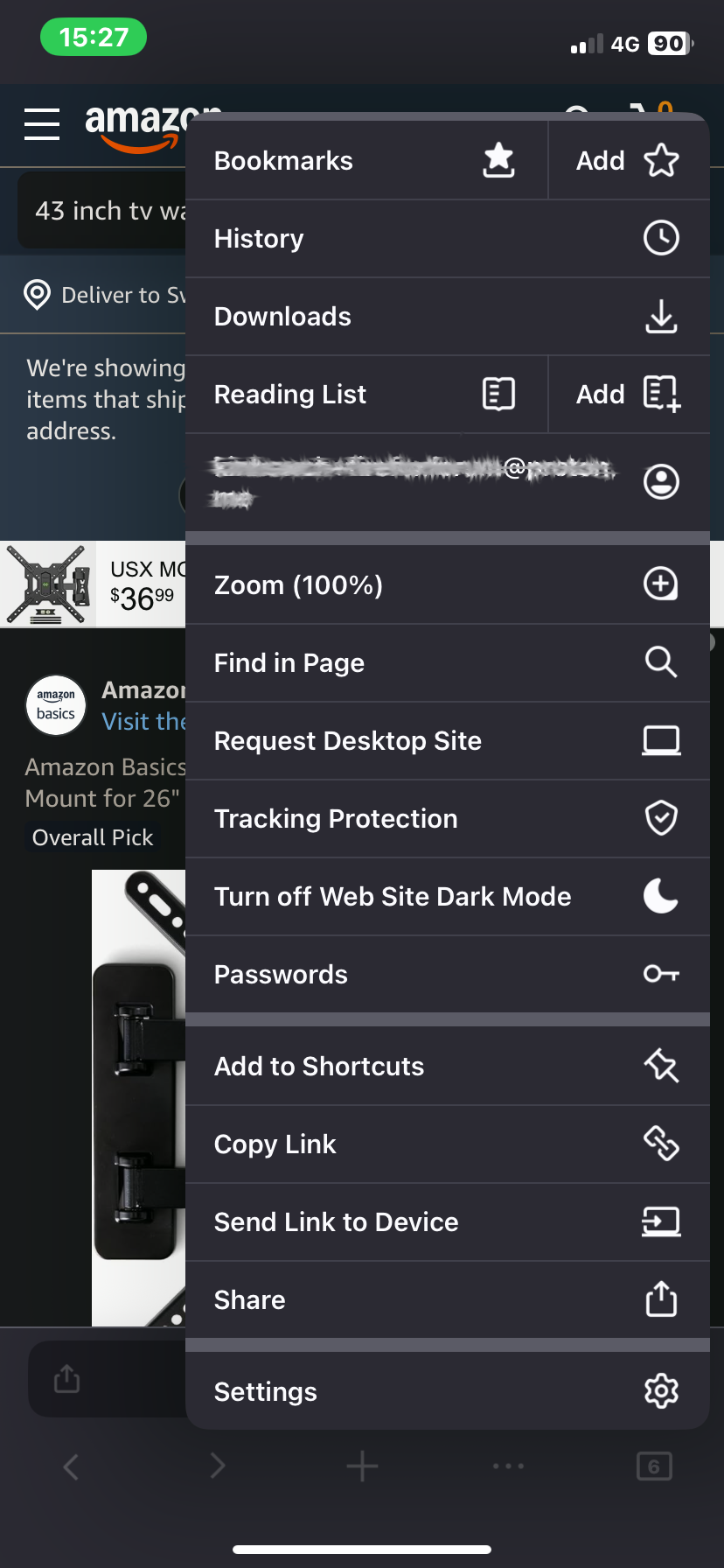
Hello, I simply need to add bookmarks, but when I select Add on the phone Firefox app, nothing happens? Phone: iPhone 11 iOS 18.5 Firefox app: Firefox 141.2 (59350) Here's what I'm doing: Phone -> Firefox app -> 3 horizontal dots (bottom right) -> Add (top right. I then check for the added bookmark, but find no new bookmark in: Phone -> Firefox app -> 3 horizontal dots (bottom right) -> Bookmarks (top left) -> Star tab is selected by default -> Desktop Bookmarks -> Unsorted Bookmarks -> This folder is empty Bookmarks Toolbar -> my bookmarks which are synced with the desktop Bookmarks Menu -> Bookmarks -> This folder is empty
Csatolt képernyőmentések

Összes válasz (1)

Hi there,

Your question appears to be a duplicate of /questions/1540946. As a moderator, I'm going to lock this question. Please refer to the linked thread for existing answers and ongoing discussion.