Windows 10 reached EOS (end of support) on October 14, 2025. For more information, see this article.

Támogatás keresése

Kerülje el a támogatási csalásokat. Sosem kérjük arra, hogy hívjon fel egy telefonszámot vagy osszon meg személyes információkat. Jelentse a gyanús tevékenységeket a „Visszaélés bejelentése” lehetőséggel.

További tudnivalók

A témacsoportot lezárták és archiválták. Tegyen fel új kérdést, ha segítségre van szüksége.

Bookmarks and new tabs

  • 2 válasz
  • 1 embernek van ilyen problémája
  • 290 megtekintés
  • Utolsó üzenet ettől: jonzn4SUSE

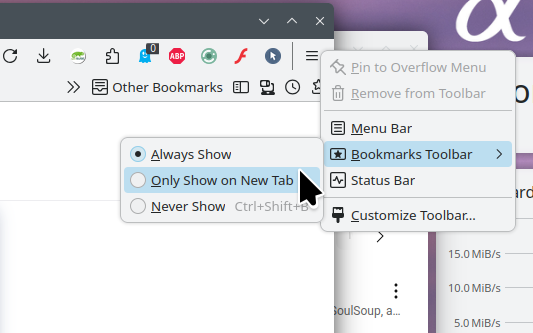
When using the new version of Firefox, I found that bookmarks only appeared in new tabs. Once I opened other web pages, there were no bookmarks above the screen, which made me feel inconvenient. Previously, the new tabs could also be customized, but now they can only be blank or the default pages of Firefox. So, can the new version of Firefox solve these problems? Or which of the older versions of Firefox can still meet my requirements?

When using the new version of Firefox, I found that bookmarks only appeared in new tabs. Once I opened other web pages, there were no bookmarks above the screen, which made me feel inconvenient. Previously, the new tabs could also be customized, but now they can only be blank or the default pages of Firefox. So, can the new version of Firefox solve these problems? Or which of the older versions of Firefox can still meet my requirements?

Összes válasz (2)

Hi

This support article should help:

https://support.mozilla.org/en-US/kb/bookmarks-firefox#w_bookmarks-toolbar

I noticed that you are using an older version of Firefox. I recommend that you update so that have the latest security and stability fixes. This support article should help;

https://support.mozilla.org/en-US/kb/update-firefox-latest-release

Sounds like you need to right click on the menu, then go Bookmark Toolbar, then Always show. see screenshot