


Make "Drag Space" work when maximized?

Recently i updated to version 57, it broke a plugin that i used to use called stylish. I think it was replaced with a plugin called stylus. Using that add-on i had a style which added a one pixel line above the tabs when maximized, it stopped working after i updated.
This is the style in question
@namespace url(http://www.mozilla.org/keymaster/gatekeeper/there.is.only.xul);
- TabsToolbar {
margin-top: 1px;
}
Anyways, i saw that in this new firefox version an option called "Drag Space" was added to the customize window, it's exactly what i want but it doesn't work when maximized. I know that i can enable "Title Bar" which is kinda what I'm looking for but it adds a bunch of other things i don't need and ruins the style of the window. I'm hoping that "Drag Space" can be made to work when firefox is maximized, thanks.
Összes válasz (2)
Kiválasztott megoldás
Hi CyanSlinky, extensions for Firefox 57 can no longer style the user interface. Instead, you need to copy your user styles for the UI into a file named userChrome.css. I recently created a website with info on userChrome.css. When you have 5 minutes: https://www.userchrome.org/
There is a blank area on the left end of the tab bar when Firefox is in a resizable window that you can use to drag the window around. but when Firefox is maximized, of course you can't move the window, so it sounds like more of an aesthetic preference for which you will still need a rule.
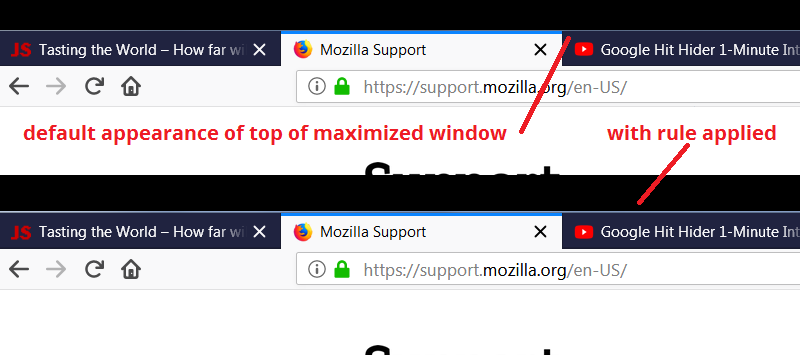
This should still work as illustrated in the attached screenshot (pasted on a black background to improve visibility):
#TabsToolbar {
    margin-top: 1px;
}
Thank you so much, that actually worked! and not just aesthetically either.