


Why does my copy text get overriden when I try to create a hyperlink in WordPress?

I've confirmed this is not a WordPress issue by using a different browser.
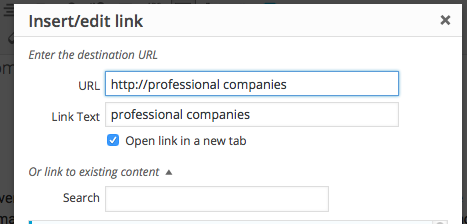
My process has always been the same: I copy a URL, then go to WordPress to create a hyperlink. I select the text I want to turn into a hyperlink and click the link button. But now, when I select the text and click the link button, the selected text has become my copied text.
Módosította: monnibo,
Kiválasztott megoldás
I've figured it out! It was a feature of one of the add-ons I have.
The add-on was called "Word Count Professional" by Bibooki. One of the features is 'Auto copy to clipboard when selected some texts'. I don't know why this was necessary for a Word Count plugin, but disabling it seems to have solved the problem.
Összes válasz (5)

Try this; Open the link maker first. Then copy and paste.
Módosította: FredMcD,
Are you using Find in the page? A while back users reported that in the Mac version of Firefox, using Find when text is selected might replace the text on the keyboard clipboard, perhaps if you used Command+e instead of Command+f. ?? Unfortunately, I can't recall the details at this point.
Módosította: jscher2000 - Support Volunteer,
FredMcD – My process is:
- Go to tab, highlight URL, Cmd+C
- Go back to WordPress tab
- Highlight words in text, press hyperlink button
- Cmd+V
- Result = highlighted words are pasted, not URL.
jscher2000 - No, I'm not using Find. Just Cmd+C and Cmd+V
Kiválasztott megoldás
I've figured it out! It was a feature of one of the add-ons I have.
The add-on was called "Word Count Professional" by Bibooki. One of the features is 'Auto copy to clipboard when selected some texts'. I don't know why this was necessary for a Word Count plugin, but disabling it seems to have solved the problem.
That was very good work. Well Done.