


how to change font family of title bar?

When I view Myanmar websites, Firefox title bar is showing square boxes instead of the characters. I tried changing the Windows title bar font, but it didn't work for Firefox. (It worked in the old versions.) I tried themes font changer add-on, but it can only change the menu bar and tab bar, and not the title bar font. And Myanmar language is not supported in Windows 7, so it's impossible to do with regional settings.
I can't find a way to solve it. Could anybody kindly help me with this issue?
פתרון נבחר
No problems here.
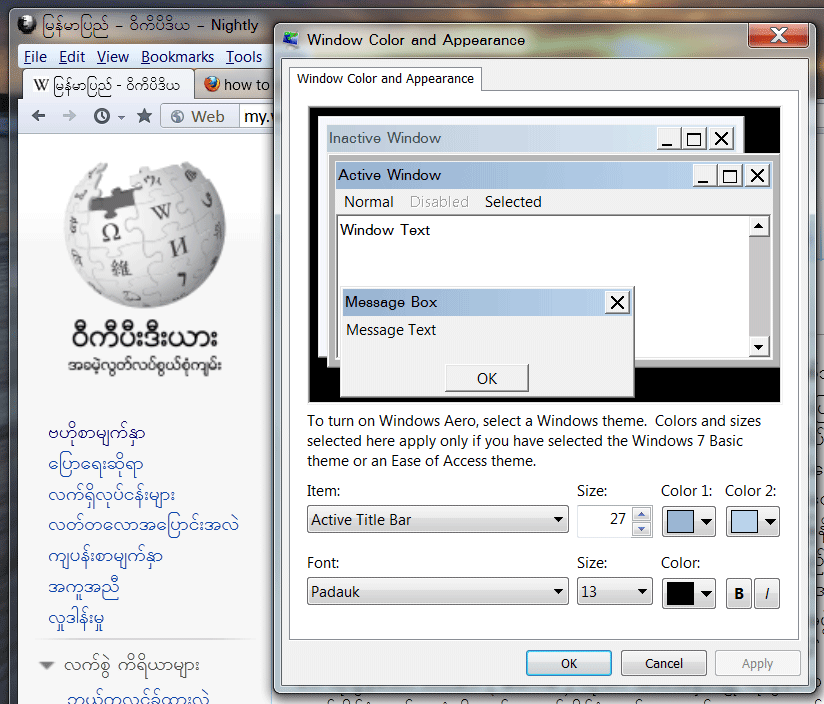
- Right-click the desktop and choose Personalize.
- Click Window Color at the bottom of the window.
- Click Advanced appearance settings at the bottom of the window.
- From the Item list, choose “Active Title Bar”.
- From the Font list, choose an appropriate font.
- Click the Apply button.
כל התגובות (3)
פתרון נבחר
No problems here.
- Right-click the desktop and choose Personalize.
- Click Window Color at the bottom of the window.
- Click Advanced appearance settings at the bottom of the window.
- From the Item list, choose “Active Title Bar”.
- From the Font list, choose an appropriate font.
- Click the Apply button.
Thank you so much, Gingerbread_Man. I tried the method again, but it didn't work. However, since I now know it works in other PC, I've reinstalled the OS, and the title bar font is showing again. I think a program (might be an input method) was making the inappropriate display.
Thanks again. mgmg
This can also be caused by the Unicode setting.