


"may be an image of text that says"
I'd be v grateful for help as this problem's in an email needed for me to sue for libel.
I drafted an email containing >50 screenshots, but not as attachments. Current download speed 257Mb/s.
Looking at it just now, it's saved with many instances saying "may be an image of text that says" followed by a description. Or as attached.
I thought that if I sent it to myself it may display correctly, but it doesn't. There's no notification bar.
I have the following settings: • View > Display Attachments Inline: checked. • Privacy settings > Allow remote content in messages: checked (no exceptions).

השתנתה ב־ על־ידי Andrew
כל התגובות (14)
Do you have View>message body set to original HTML? Are they screenshots that are embedded into an HTML document? The screenshot you posted seems incomplete. Possibly posting a larger view would clarify the issue.
Yes, Original HTML.
I'm not clever enough with terminology to understand what's meant by embedded. They're screenshots like the one attached, which is one in the same email that's displayed correctly.
The screenshot I posted in my original question *is* incomplete - that's the problem. In some cases, the image is replaced by "may be an image of text that says...", and in others, there's only the small box you see on the screenshot (x2).
My email address is a Gmail. If I view this email at mail.google.com, it's displayed the same as in TB.
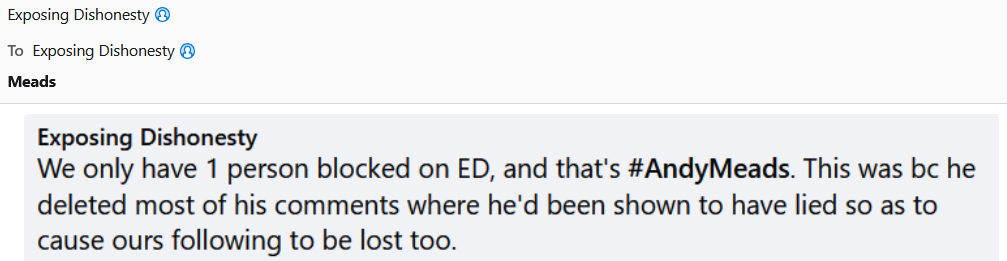
השתנתה ב־ על־ידי Andrew
Yes, Original HTML.
I'm not clever enough with terminology to understand what's meant by embedded. They're screenshots like the one attached, which is in the same email but displayed correctly.
The screenshot I posted in my original question *is* incomplete - that's the problem. In some cases, the image is replaced by "may be an image of text that says...", and in others, there's only the small box you see on the screenshot (x2).
If I view this email at mail.google.com, it's displayed the same as in TB.
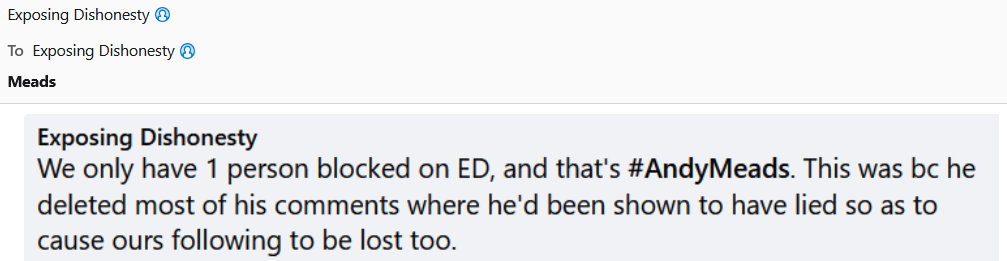
השתנתה ב־ על־ידי Andrew

Your screen image above shows links to Facebook items. You said that you put screenshots into your e-mail message. A screenshot would not have a link; it would be only an image.
So you must have put links into your message, not images (screenshots).
The email contains links followed by screenshots of what can be (or could be) found at those links.
Where you see links followed by small boxes, the small boxes are in place of the screenshots.
Then they are not screenshots.
What is your process for getting the items and putting them into a message?
Taking a screenshot using PrtSc, then going to email and pasting using Ctrl+V.
Then PrtSc is doing something that I did not think was possible and that AI says it does not do.
Are there any other steps in your process?
I am not questioning the copying and pasting. I am questioning the source of the URL (link). How does a print screen function get a Web address?
Andrew said
The email contains links followed by screenshots of what can be (or could be) found at those links. Where you see links followed by small boxes, the small boxes are in place of the screenshots.
It doesn't.
The screenshot I attached was of the web addresses followed by the screenshots of fb I took.
I understand.
Rick said
I understand.
Wait, no I don’t. I thought that you were explaining where the web addresses came from, but you were not.
I know that those are web addresses followed by your screenshots. My whole issue is: How did the addresses get into the message? Did you type them?
In any case, more to your question: Is there an image-to-text converter active on your system, maybe for accessibility? That is the kind of program that would interpret text in an image and produce the message “may be an image of text that says”. Maybe a Thunderbird add-on?
I have no experience with image-to-text functions.
Puzzling.. If you press the prtsc key and then paste into thunderbird, the screenshot would appear as a picture in the message, so it doesn't match what you're saying. Were you wanting to show the URL address and have an attachment of the screenshot? If the URLls sufficiently document your issue, I question the need for the screenshots... but that's off-topic. Suggestion: explain what you are wanting to achieve and we may be able to offer suggestions. thank you.