


Hotmail personal account: IMAP OAuth2 works but SMTP OAuth2 fails with message: 535 5.7.139 “SmtpClientAuthentication is disabled for the Mailbox”
I am assisting an elderly user with a personal @hotmail.com account that receives email successfully in Thunderbird but cannot send. I have confirmed they can send and receive emails from their online outlook.com portal. The user's computer setup is as follows:
- Windows 11 (with latest updates).
- Thunderbird 153.0.2 (64-bit).
- A personal @hotmail.com account with the following server configurations:
  -> Incoming IMAP: outlook.office365.com, port 993, SSL/TLS, OAuth2, and
  -> Outgoing SMTP: smtp-mail.outlook.com, port 587, STARTTLS, OAuth2.
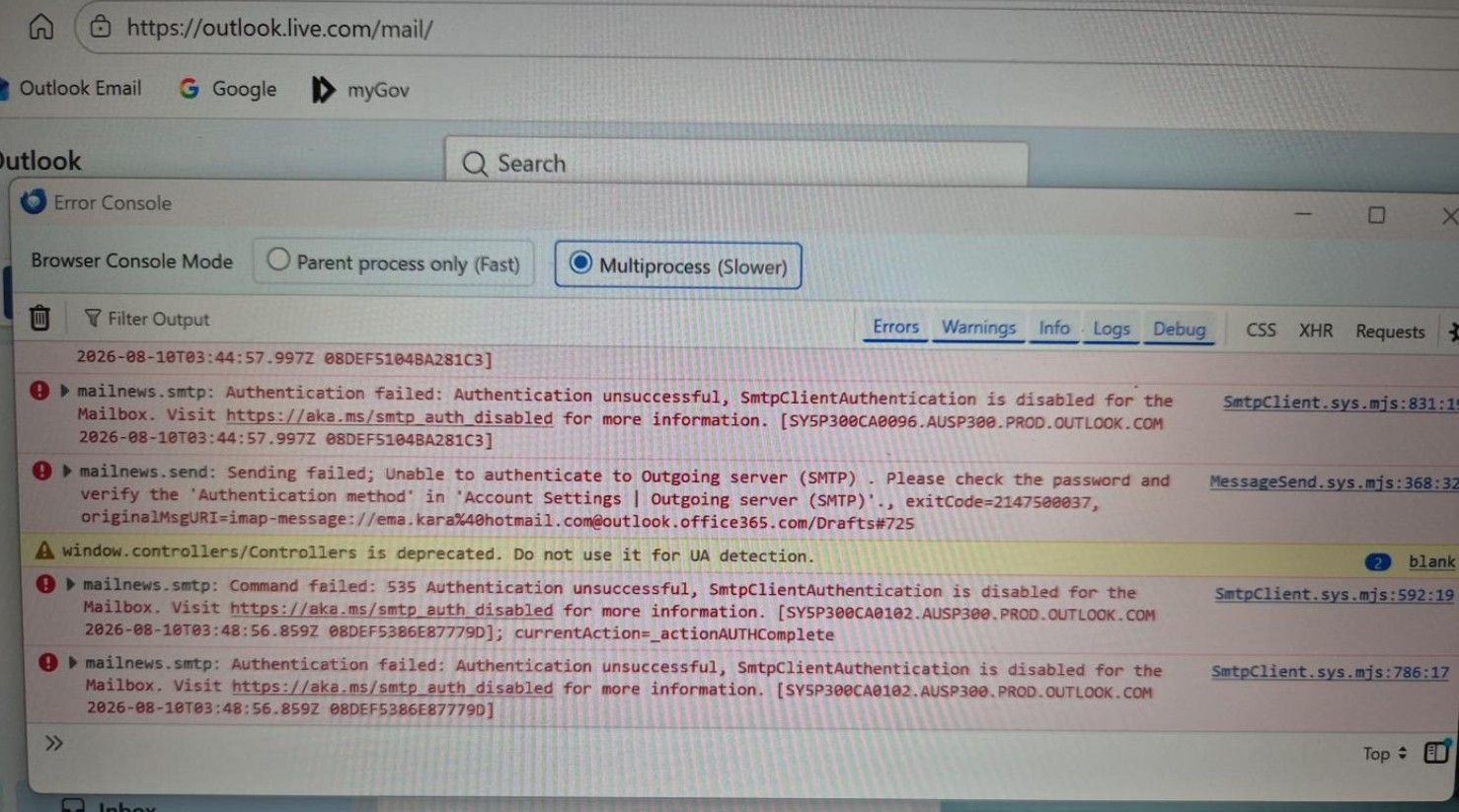
Thunderbird successfully authenticates to Microsoft using OAuth2 for incoming email. However, when Thunderbird attempts outgoing email authentication, Microsoft's SMTP server rejects the authentication. The Error Console in Thunderbird records this message: "535 5.7.139 Authentication unsuccessful, SmtpClientAuthentication is disabled for the Mailbox."
-> Refer to attached image: "Thunderbird Error Console_20260811.jpg". -> I am able to provide a short screen recording demonstrating the failure if needed.
To try and resolve the above, I completed the following actions:
- Confirmed Thunderbird is current (153.0.2).
- Confirmed SMTP is configured for OAuth2 rather than Normal Password.
- Confirmed port 587 and STARTTLS.
- Re-authorised the Microsoft account/OAuth connection.
- Confirmed IMAP OAuth2 works.
- Confirmed Outlook.com webmail can send successfully.
- Reviewed Mozilla's current “Microsoft OAuth Authentication and Thunderbird in 2026” guidance, including the section covering cases where IMAP/POP works but SMTP does not.
- Captured the SMTP failure in Thunderbird's Error Console.
However nothing worked, so I raised the matter with Microsoft support and eventually had the matter referred to their Tier 2 team. The Microsoft case number is: 7107041963.
Microsoft Support confirmed that for a personal Outlook.com/Hotmail account there is no user-accessible mailbox-level SMTP AUTH setting, and advised that SMTP is enabled by default for supported clients. However, because sending from Outlook.com webmail works, Microsoft Tier 2 declined to investigate the SMTP server response further and directed me to Thunderbird support.
I am able to provide a copy of the chat transcript if needed.
In any event, the TLDR version IMAP works using OAuth2, but SMTP using OAuth2 fails because Microsoft's SMTP server reports SmtpClientAuthentication is disabled for the Mailbox. Microsoft Tier 2 has referred the issue to Thunderbird support.
Questions:
- Is this a known current issue affecting personal Outlook.com/Hotmail accounts using Thunderbird?
- Is 535 5.7.139 SmtpClientAuthentication is disabled for the Mailbox known to occur with Thunderbird OAuth2 even though IMAP OAuth2 succeeds?
- Is there a current Thunderbird-side workaround or alternative SMTP server/configuration recommended for personal Hotmail accounts?
- Would changing the SMTP server from smtp-mail.outlook.com to smtp.office365.com be appropriate for a personal Hotmail account in Thunderbird 153, or should the current Microsoft-documented server be retained?
-> I note there appears to be conflicting advice on this point in previous support threads.
- Given that IMAP OAuth2 authentication succeeds for the same Microsoft account, does this indicate that Thunderbird's Microsoft OAuth authorisation itself is functioning correctly, or could SMTP require a separate permission/token that may be failing?
- Are there any additional Thunderbird logs or diagnostics I can provide that would help resolve this matter?
Disclosure: I used ChatGPT to help organise my troubleshooting notes and technical details for this post. The troubleshooting, observations and diagnostic information described above are from my own work on the affected PC.
כל התגובות (6)
Additional information / potentially related case
Since posting the above, I have found a very recent Microsoft Q&A thread (3 August 2026) describing what appears to be the same issue:
Microsoft Q&A – Unable to send email from personal Outlook.com account via SMTP OAuth2
Of particular interest, the user has multiple Outlook.com accounts configured in the same Thunderbird installation. Two accounts successfully send using SMTP/OAuth2, while another account fails with the same:
535 5.7.139 Authentication unsuccessful, SmtpClientAuthentication is disabled for the Mailbox
The Microsoft moderator subsequently advised:
"Since the same Thunderbird configuration works with your other Outlook.com accounts, this appears to require an account-level review."
This seems particularly relevant to my issue because it provides another recent example where Thunderbird/OAuth2 itself appears to be functioning, but Microsoft's SMTP server rejects authentication for a particular personal Outlook.com mailbox.
Interestingly, Microsoft Support took the opposite position in my case (Case 7107041963) and referred me back to Thunderbird Support because Outlook.com webmail could send successfully.
I thought this additional case may be useful in determining whether this is a current Thunderbird interoperability issue or a Microsoft mailbox/account-level SMTP issue.

My smtp servers for outlook is set to smtp.office365.com and it works for me.
My smtp server for outlook is set to smtp.office365.com
Michel T said
My smtp server for outlook is set to smtp.office365.com
Thanks Michael, I'll give this a try, when I see her again next week.

Tested smtp.office365.com with port 587, STARTTLS, OAuth2. It also failed authentication. smtp-mail.outlook.com remains the only host that connects successfully, but Microsoft then returns 535 5.7.139 SmtpClientAuthentication is disabled for the Mailbox.
I also contacted Microsoft/Outlook.com Support. They agreed the issue is isolated to this mailbox and confirmed that personal Hotmail accounts do not have a user-facing SMTP AUTH setting. They also said Microsoft Support cannot manually enable SMTP AUTH for an individual personal mailbox and referred me back to Thunderbird Support.
So at this point, I am trying to determine whether Thunderbird has any supported workaround for newly created personal Hotmail accounts where Microsoft returns 535 5.7.139 SmtpClientAuthentication is disabled for the Mailbox.
I have read several related articles that appear to have a fix/workaround, but I'm afraid I still have this same issue – I have gone through them, carried out steps, tested, removed old entries, etc, etc. I have multiple Outlook accounts configured in TB and they work fine, but all the new ones – I created this year – are unable to send email due to the password being incorrect, but are still able to receive emails. Suffice to say, I won't be interested in any more posts providing workarounds. It seems TB Support possibly do not understand the underlying issue well enough I'm afraid.