Untractable SPAM

ThB & cPanel filters (a) don't catch all SPAM and (b) send legitimate mail to the Junk folder. Together, the 2 problems cause a large amount of work. Because of (b), I must regularly go through the Junk folder. Because of (a), the Junk folder contains a huge number of messages. (a) Messages from serial spammers trying to spoof Costco, Marriott, AAA, Blue Cross, etc. that I have flagged as SPAM dozens of times IN ALL THEIR VARIATIONS, still appear both in the Junk folder and in the Inbox (including messages with the red SPAM marker turned on, which to remove from the Inbox I must first click to mark them as non-S{AM, then click again to mark them as SPAM). (b) Messages from senders who have sent hundreds of messages before that have gotten through and who are in my contacts list regularly and in significant numbers end up in the Junk folder. I tried to set up filters in Spam Assassin. They made no difference. I tried to set up e-mail filters in cPanel, which entirely removed messages before they even reached ThB. These were quite effective, but although I created them very carefully using regex to capture every variation of COSTCO spelled with Os and 9s, etc., they also ended up removing legitimate messages (and none of my senders mentions AAA or BlueCross in their messages). I really have no clue how to proceed. None of the advice that AI or ISP support provided helped. Thank you for taking the time.
כל התגובות (4)
Perhaps settle on a single spam management tool.
I only use Thunderbird and whatever GMX and Google force on me. Mostly is works because I rely on the learning parts of the algorithms and understand that having regard to the from address is a complete waste of time as is filtering on individual words.
CPanel alludes to you paying for email hosting which has nothing at all to do with your ISP, unless they are the hosts, so why involve them at all.
What spam tools does your mail host deploy other than the one you use in cPanel? I do not know, but you need to! Not only to know what tools they use but how they will interact with your mail and more importantly to you your own filtering in cPanel and Spamassasin.
Thunderbird filtering is simple to understand once you abandon the fallacy that the from has any real relevance in determining if the content of mail is SPAM. There is fairly comprehensive documentation here https://support.mozilla.org/en-US/kb/thunderbird-and-junk-spam-messages where you are directed to the right click empty spam command to clear out the spam folder once you have unmarked false positives.
Matt, thank you so much for your answer. I will certainly check out the Mozilla article. Just two clarifications: I disabled all my filters (incidentally, I filtered on subject line and content as well). The only thing I use is Spamassassin and ThB filtering. But I cannot "unmark false positives" in the Junk folder. Unless freshly directed there by me (by clicking Spam in the Inbox), they are all unmarked. In other words, they were not placed there by ThB but, most likely, by Spamassassin. And I cannot "train" Spamassassin. Do you recommend disabling Spamassassin and relying entirely on ThB filtering and judicious training?
check the status of the spam flag in the message list. Some will be red (ish) and some will be grey. Thunderbird has nothing to do with the grey ones getting into the spam folder they usually get there through ISP/Provider spam filtering but I have seen antivirus products that think they need another bow start filtering for SPAM and usually making a right mess of it.
It is in understanding how they get there that you can tackle the source of your aggravation and at this point it does not sound like Thunderbird. Note that Thunderbird can be set to accept the findings of spamassasin and they work well together.
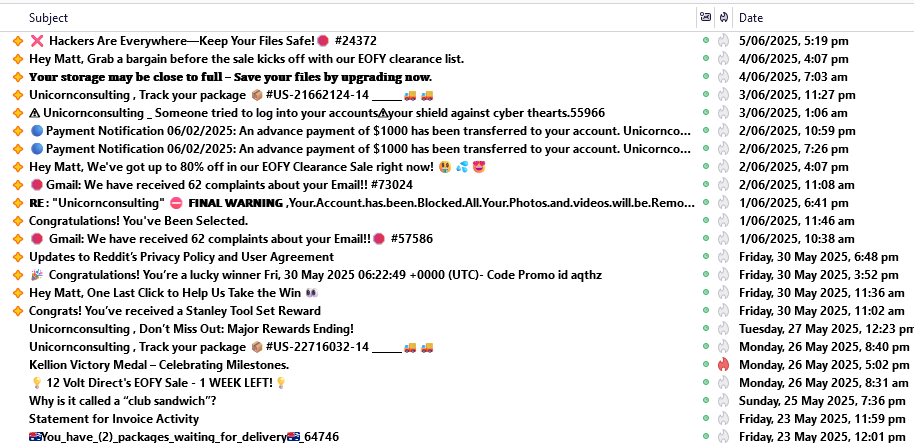
This image shows a collection of email in my spam folder on google from last year (this is not a new topic and I tend to get testy because I have been repeating myself for a decade on the same stuff). Only one of those mails in that folder was set as spam by Thunderbird the rest are there because of Googles spam filtering.
Your mileage will differ, but understanding is the key.
Matt, sorry to be a bore... I can see how the same questions keep coming up by new users, like myself. I'm looking at the mails accumulated in your Spam folder in the space of a week; I get this number in a few hours. Evidently, the filtering done by your host is much better than what Spamassassin does. On my list, all the messages with the red Spam icon were marked as Spam by me. There are no messages that the ThB filter caught, despite my repeatedly flagging these messages. And I cannot have the ones flagged by Spamassissin deleted outright because they contain many legitimate mails and I must go through them each time before deleting them (this is why I have them listed alphabetically).