


פתוחה
Make better use of screen realestate on tablets

Is it possible to make Thunderbird make better use of screen realestate on large devices such as tablets?
In my opinion it should be possible to get a view that is more similar to the desktop version, where the content is laid out in 3 columns:
- List of accounts and mailboxes
- List of messages in the selected folder/mailbox
- The email/message that has been selected.
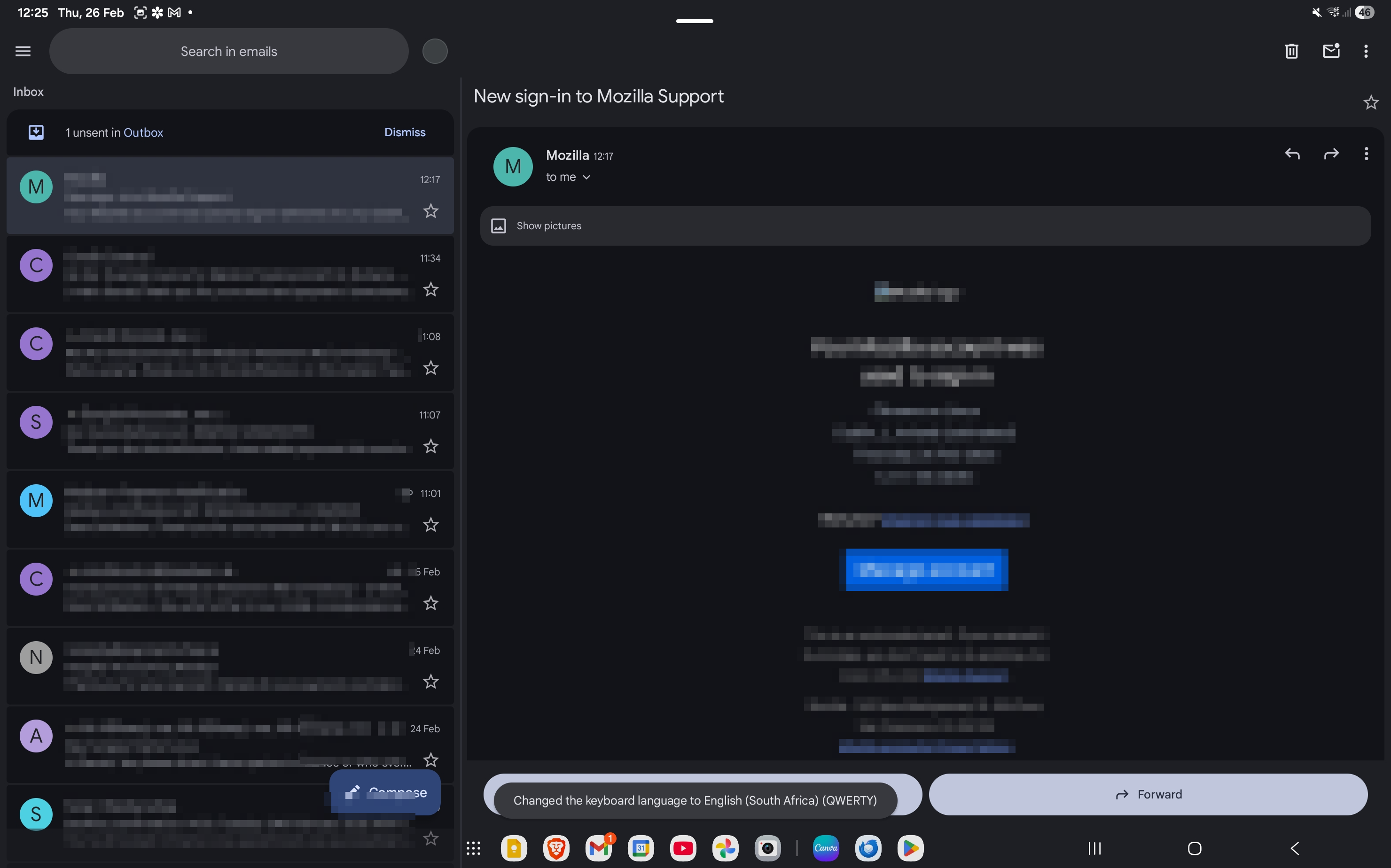
See attached for what it looks like in the gmail app, for comparison. On Gmail they only have two columns, but even on there it's making effective use of the space.
Is it possible to make Thunderbird make better use of screen realestate on large devices such as tablets?
In my opinion it should be possible to get a view that is more similar to the desktop version, where the content is laid out in 3 columns:
# List of accounts and mailboxes
# List of messages in the selected folder/mailbox
# The email/message that has been selected.
See attached for what it looks like in the gmail app, for comparison. On Gmail they only have two columns, but even on there it's making effective use of the space.
כל התגובות (1)

The app supports a two column view. Navigate to general settings > display > show split-screen.
The best place to promote your idea for a 3 column view is on Mozilla connect where the community can vote on it.
https://connect.mozilla.org/t5/ideas/idb-p/ideas/label-name/thunderbird%20android