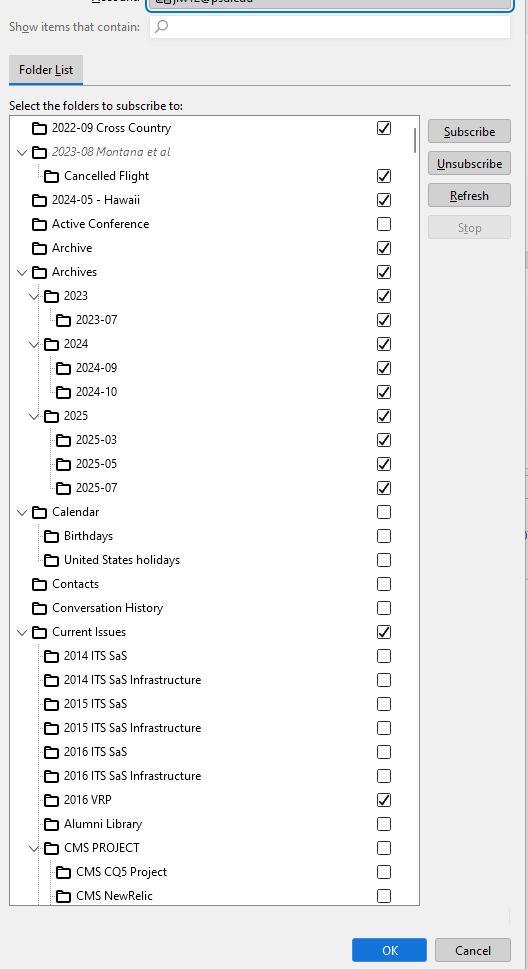
IMAP subscriptions on an Outlook.Office365.com server can't be removed

I use a work email server outsourced to office365.com and Thunderbird v115.18.0 (64-bit).
I connect using Thunderbird with IMAP, and am subscribed to 100s of my folders there.
I reorganized my folders there, moving them about using THUNDERBIRD (not, as I've learned now, using the Outlook Web interface that I "should" have used). Needless to say, I was only moving subscribed folders about.
Now I find that the subscriptions to folders which have been moved or even deleted cannot be manipulated. Folders with the same name but now in different hierarchies can't be subscribed to.
I have removed the account, recreated it and Unsubscribed from EVERY FOLDER. But the erroneous subscriptions do not go away.
I use a work email server outsourced to office365.com and Thunderbird v115.18.0 (64-bit).
I connect using Thunderbird with IMAP, and am subscribed to 100s of my folders there.
I reorganized my folders there, moving them about using THUNDERBIRD (not, as I've learned now, using the Outlook Web interface that I "should" have used). Needless to say, I was only moving subscribed folders about.
Now I find that the subscriptions to folders which have been moved or even deleted cannot be manipulated. Folders with the same name but now in different hierarchies can't be subscribed to.
I have removed the account, recreated it and Unsubscribed from EVERY FOLDER. But the erroneous subscriptions do not go away.