


Windows 10 will reach EOS (end of support) on October 14, 2025. For more information, see this article.

חיפוש בתמיכה

יש להימנע מהונאות תמיכה. לעולם לא נבקש ממך להתקשר או לשלוח הודעת טקסט למספר טלפון או לשתף מידע אישי. נא לדווח על כל פעילות חשודה באמצעות באפשרות ״דיווח על שימוש לרעה״.

מידע נוסף

Mail that is deleted no longer goes to the 'Trash' folder

  • 1 תגובה
  • 0 have this problem
  • 15 views
  • תגובה אחרונה מאת asahukar

more options

I have several email accounts of all types (IMAP, POP, etc.) managed by a single Thunderbird instance (v140.3.1esr 64-bit) running on Windows 11 (latest update).

A few weeks ago, I noticed that the 'Trash' folder on one of my IMAP accounts lost the 'Empty Trash' context menu item. Email I deleted still went to the 'Trash' folder, but I needed to delete them manually. 'Trash' folders on other accounts continued to work as expected.

This afternoon, I noticed that the deleted mails were no longer going to the 'Trash' folder. Looking this up online, I found the following old topic from 2023: https://support.mozilla.org/en-US/questions/1420657

However, the link cited within that post (https://support.mozilla.org/en-US/questions/1156586) no longer seems to exist and the details cited there no longer seems to be applicable as the interface and other details provided are no longer representative of the product today.

The elements of the post that seem applicable is a potential corruption of the 'Smart Mailboxes'. If I look at <ProfilePath>/Mail/smart mailboxes, I have several files associated with folders that may or may not be associated with the 'Trash' folder of the email account suffering from this problem. Given the date stamps, I'm not sure what they represent or even if they are involved in the currently running product.

Do note that I have been using this client for more going on 20 years.

Can you please provide updated troubleshooting steps and help me understand how I can map the folders under 'Mail' to the appropriate accounts to be sure I am not disturbing account email that is functioning properly.

Thanks in advance for the help,

AJ
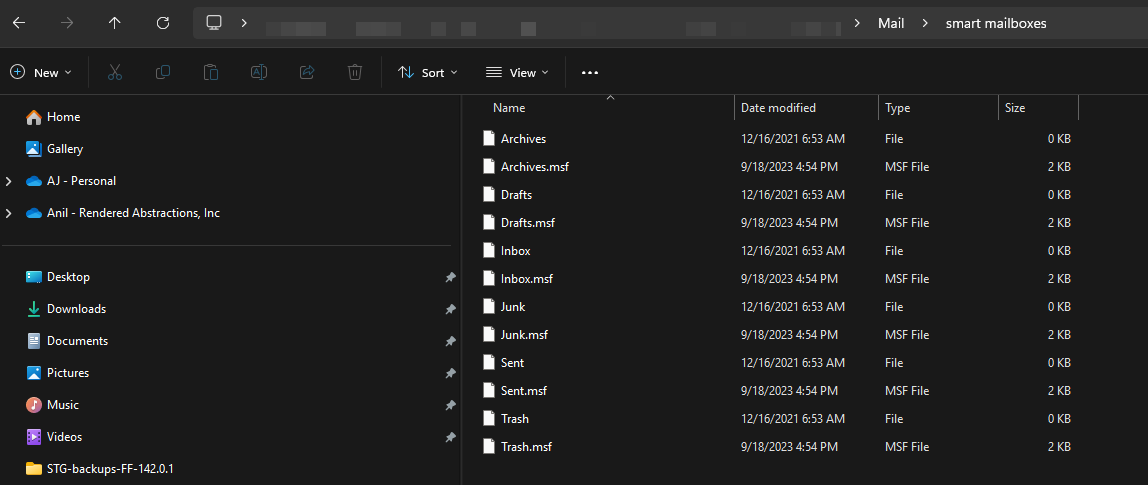
I have several email accounts of all types (IMAP, POP, etc.) managed by a single Thunderbird instance (v140.3.1esr 64-bit) running on Windows 11 (latest update). A few weeks ago, I noticed that the 'Trash' folder on one of my IMAP accounts lost the 'Empty Trash' context menu item. Email I deleted still went to the 'Trash' folder, but I needed to delete them manually. 'Trash' folders on other accounts continued to work as expected. This afternoon, I noticed that the deleted mails were no longer going to the 'Trash' folder. Looking this up online, I found the following old topic from 2023: https://support.mozilla.org/en-US/questions/1420657 However, the link cited within that post (https://support.mozilla.org/en-US/questions/1156586) no longer seems to exist and the details cited there no longer seems to be applicable as the interface and other details provided are no longer representative of the product today. The elements of the post that seem applicable is a potential corruption of the 'Smart Mailboxes'. If I look at <ProfilePath>/Mail/smart mailboxes, I have several files associated with folders that may or may not be associated with the 'Trash' folder of the email account suffering from this problem. Given the date stamps, I'm not sure what they represent or even if they are involved in the currently running product. Do note that I have been using this client for more going on 20 years. Can you please provide updated troubleshooting steps and help me understand how I can map the folders under 'Mail' to the appropriate accounts to be sure I am not disturbing account email that is functioning properly. Thanks in advance for the help, AJ
צילומי מסך מצורפים

כל התגובות (1)

more options

FYI Update: Found a stray trailing colon (:) character in the link https://support.mozilla.org/en-US/questions/1156586 -- without this, the link works.

Helpful?

פרסום שאלה

You must log in to your account to reply to posts. Please start a new question, if you do not have an account yet.