


Windows 10 reached EOS (end of support) on October 14, 2025. For more information, see this article.

חיפוש בתמיכה

יש להימנע מהונאות תמיכה. לעולם לא נבקש ממך להתקשר או לשלוח הודעת טקסט למספר טלפון או לשתף מידע אישי. נא לדווח על כל פעילות חשודה באמצעות באפשרות ״דיווח על שימוש לרעה״.

מידע נוסף

Multiple entries for Firefox in Installed Apps

  • 1 תגובה
  • 0 have this problem
  • 162 views
  • תגובה אחרונה מאת green.netw

Noticed 3 entries for various versions of Firefox in the Windows Settings > Apps > Installed apps. There is one Firefox record in the Start menu. 1. I have unistalled all the entries through the Windows Settings, deleted all folders for Moxilla and Firefox, cleaned the registry of every mention of Mozilla or Firefox. 2. Installed newly downloaded Firefox 137.0 three days ago. 3. After today update to v. 137.0.1 - I again have 2 entries in the Settings > Apps > Installed apps: v. 137.0 and v. 137.0.1. The same problem was with Thunderbird. I also cleaned all the folders and the Registry, then fresh installed it again. Thunderbird was not updated, so I don't know if the problem has returned. Maybe something is wrong with the Mozilla installer? What should I do to have just one Mozilla Firefox entry in the Windows Settings > Apps > Installed apps after update as it was years before? (My system is: Windows 11 Pro 24H2 English US, Firefox 64-bit English US)

Additional information: I found that the Uninstall registry entries are stored in different hives: HKEY_LOCAL_MACHINE\SOFTWARE\Microsoft\Windows\CurrentVersion\Uninstall\Mozilla Firefox 137.0 (x64 en-US) HKEY_CURRENT_USER\Software\Microsoft\Windows\CurrentVersion\Uninstall\Mozilla Firefox 137.0.1 (x64 en-US)
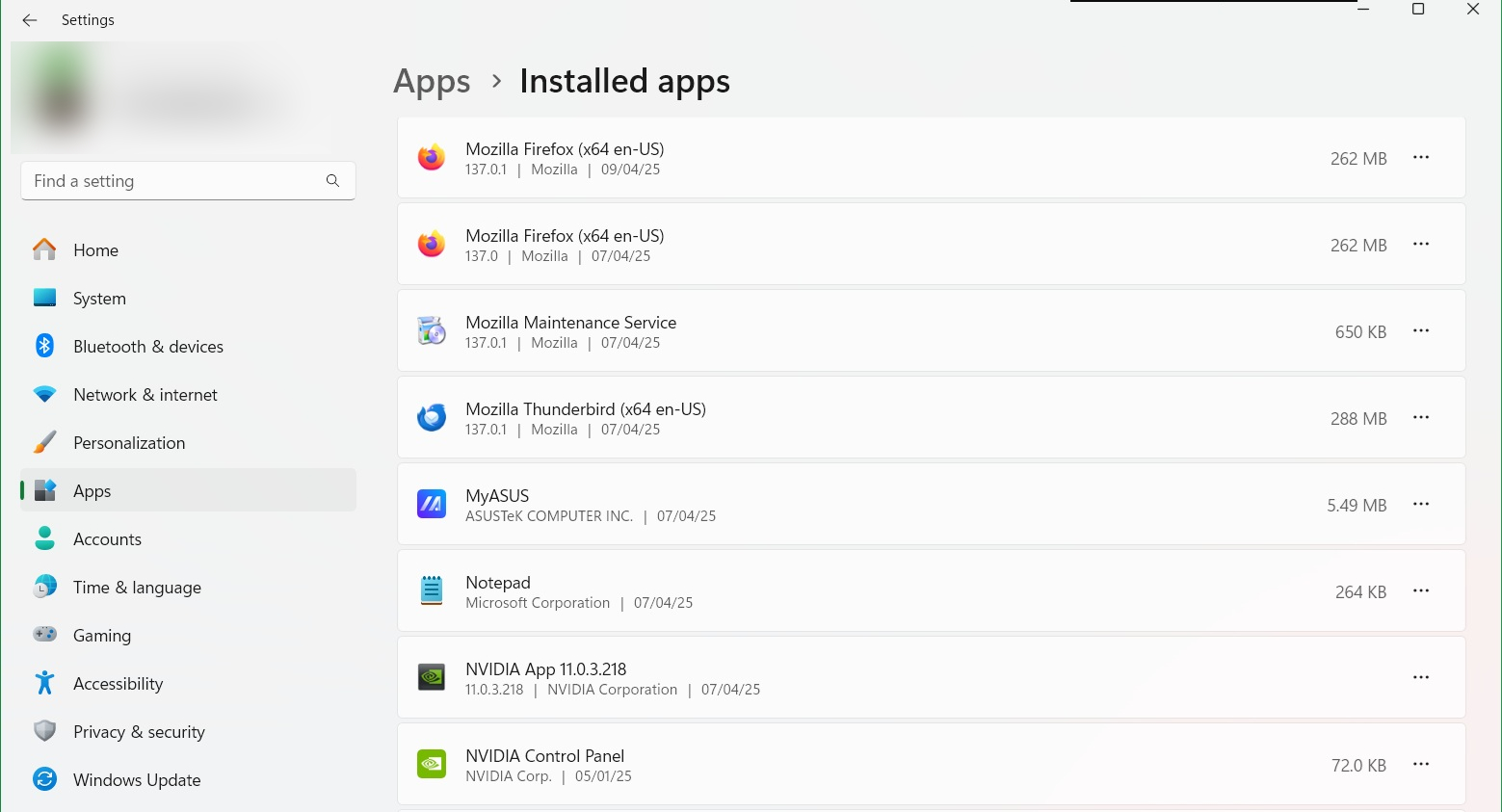
Noticed 3 entries for various versions of Firefox in the Windows Settings > Apps > Installed apps. There is one Firefox record in the Start menu. 1. I have unistalled all the entries through the Windows Settings, deleted all folders for Moxilla and Firefox, cleaned the registry of every mention of Mozilla or Firefox. 2. Installed newly downloaded Firefox 137.0 three days ago. 3. After today update to v. 137.0.1 - I again have 2 entries in the Settings > Apps > Installed apps: v. 137.0 and v. 137.0.1. The same problem was with Thunderbird. I also cleaned all the folders and the Registry, then fresh installed it again. Thunderbird was not updated, so I don't know if the problem has returned. Maybe something is wrong with the Mozilla installer? What should I do to have just one Mozilla Firefox entry in the Windows Settings > Apps > Installed apps after update as it was years before? (My system is: Windows 11 Pro 24H2 English US, Firefox 64-bit English US) Additional information: I found that the Uninstall registry entries are stored in different hives: HKEY_LOCAL_MACHINE\SOFTWARE\Microsoft\Windows\CurrentVersion\Uninstall\Mozilla Firefox 137.0 (x64 en-US) HKEY_CURRENT_USER\Software\Microsoft\Windows\CurrentVersion\Uninstall\Mozilla Firefox 137.0.1 (x64 en-US)
צילומי מסך מצורפים

השתנתה ב־ על־ידי green.netw

כל התגובות (1)

Why does the installer write data to different registry sections?

השתנתה ב־ על־ידי green.netw