


Emails drop down for Inbox folder only?
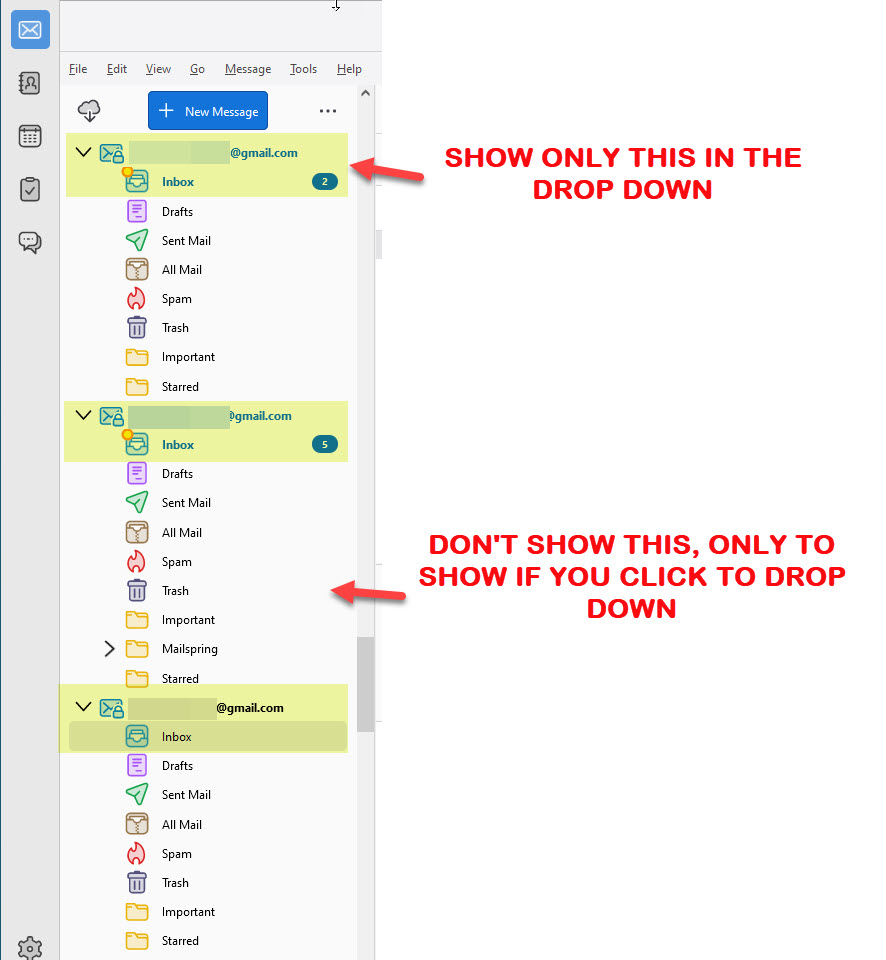
As i have few email account within Thunderbird, the list becomes kind long to scroll when to see the new emails. Is there a way maybe or if an addon exists to have each mail box open and to have just the inbox folder under neat and all other to show only if you click a drop down arrow? see image.
Thanks for help.
כל התגובות (3)
I may be misunderstanding your concern, but I think clicking 'unified folders' will accomplish much of what you want. That is set at the icon to the right of the 'new message' button. With unified folders, you can have just the inbox showing when that is all you want to see. If the message list pane shows the messages sorted to show newest at bottom, you can change that in table view' at the icon to the right of 'quick filter'
פתרון נבחר
Right-click a folder in the Folder Pane and set it as a Favourite Folder, then View/Folders/Favourite Folders. Click the 3-dot icon to move Favourite Folders up or down.
Thanks to reply to my question.
@sfhowes solution worked for me. Appreciated.