


Firefox browser

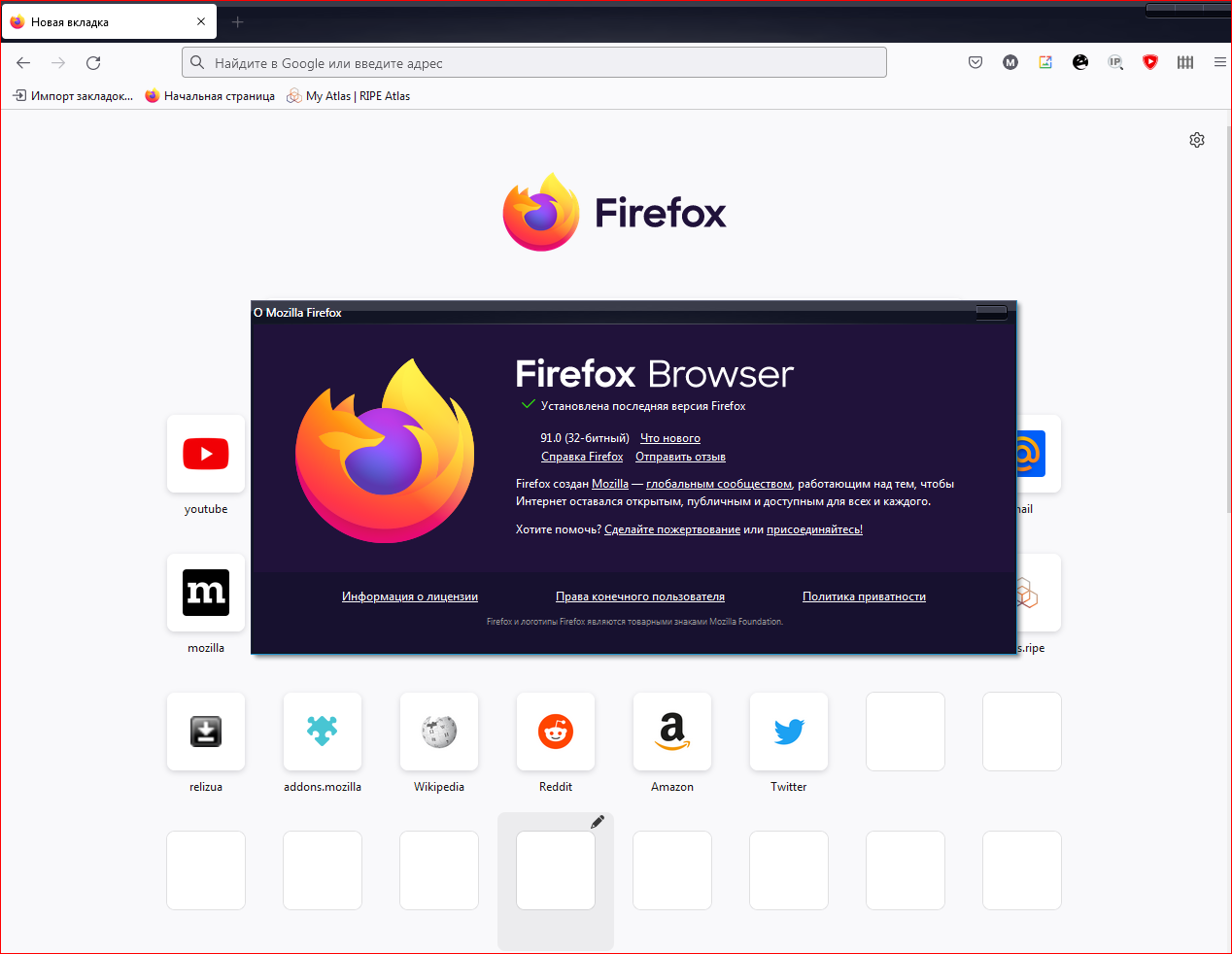
My notebook have 64bit architecture, but when i downloading Firefox installer 64bit i am get 32bit browser after installation. What is it? This is a link, where i downloaded 64bit Firefox. https://www.mozilla.org/ru/firefox/browsers/windows-64-bit/ Attention on my screenshot.
My notebook have 64bit architecture, but when i downloading Firefox installer 64bit i am get 32bit browser after installation. What is it?
This is a link, where i downloaded 64bit Firefox. https://www.mozilla.org/ru/firefox/browsers/windows-64-bit/
Attention on my screenshot.
כל התגובות (1)
Hi mr.bakinets,
- If you see “(32-bit)” and you are running Firefox 56.0 or older, updating to the latest Firefox version should automatically upgrade you to 64-bit.
- If you see “(32-bit)” and are running Firefox 56.0.1 or newer, then your computer may not meet the minimum memory requirement for 64-bit (3 GB RAM or more). You can still manually install 64-bit Firefox, if you choose.
You need to manually install 64-bit Firefox, you can simply download and re-run the Windows (32-bit or 64-bit) Firefox installer from the Firefox platforms and languages download page.
https://www.mozilla.org/en-US/firefox/all/#product-desktop-release