


deleting email
when I delete an email that I no longer need from my inbox or any other folder, the deleted email does not go into the trash folder. it disappears completely. I have searched other folders such as spam and junk and its not there either, neither is it in my local folders. not really a problem except for when an email is deleted and I may want to review it again while it is in the trash folder. I've been putting up with this for months and would like to resolve it. tried searching for answers but no luck
פתרון נבחר
Go back to the Server Settings and make sure deleted messages are sent to the IMAP Trash, e.g. Trash on <Account Name>.
כל התגובות (8)
What is the setting for 'When I delete a message' in Tools/Account Settings, Server Settings? Who is the mail provider?
when I go to Tools/Accounts Settings then Server Settings there three options for When I delete a Message, being Move to This Folder, Just Mark it as Deleted, Remove it Immediately. with Move it to This Folder the inbox is then highlighted and under that are Drafts, Sent, Archives, Junk, and Spam, but no Delete. I can select the above such as Junk then delete a message and sure enough the deleted message goes into the Junk folder. I have noticed that my Deleted Folder is under the Local Folders. I would have thought it should be under the Inbox Folders, but I cant move to under Inbox I am with Optus here in Australia. when I use their webmail I can delete messages and they end up in the Trash folder ok
Right-click the account in the Folder Pane, Subscribe..., Refresh. Is there a Trash or Deleted Items folder that is not subscribed?
sorry, dont understand this. when I right click all I get is copy or select all. I dont see where to right click the account in the folder pane
The Folder Pane lists the accounts and folders (see picture).
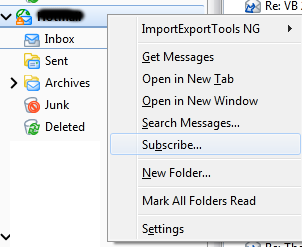
now I'm getting somewhere.
so I did that and the trash folder was unsubscribed, so ticked, clicked subscribe, refresh and ok, and now the trash folder shows up under my inbox. then I deleted an old email as a test, but still didnt land in the newly subscribed "trash" folder. there is a "deleted" folder complete with rubbish bin icon under my local folder but it is empty, deleted emails are not going there or either into the newly subscribed trash folder under my inbox
פתרון נבחר
Go back to the Server Settings and make sure deleted messages are sent to the IMAP Trash, e.g. Trash on <Account Name>.
thankyou, that solved it! thanks for your help and patience.