


'From' address when writing a new email from unified Inbox

I have a number of different email accounts configured in Thunderbird (2 x Gmail, 2 x Plusnet). When I have the Inbox of a specific account selected and start a new email then the From address is the correct one for that account. But if I have the unified Inbox selected and start a new email then it seems to default a random customised from address that I used several years ago - how can I make it default to a particular email address in this situation?
פתרון נבחר
OK I've found it. Matt's answer was close... Go to Account Settings, under the list of accounts on the left hand side there is a drop-down for Account Actions - select the account in the list that you want to be the default, then click the Account Actions drop-down and click Set as Default.
Read this answer in context 👍 0כל התגובות (3)
Go to outgoing servers (SMTP ) in account settings and select the address you wish to use as default. You might also way to delete the old address if you no longer use it.
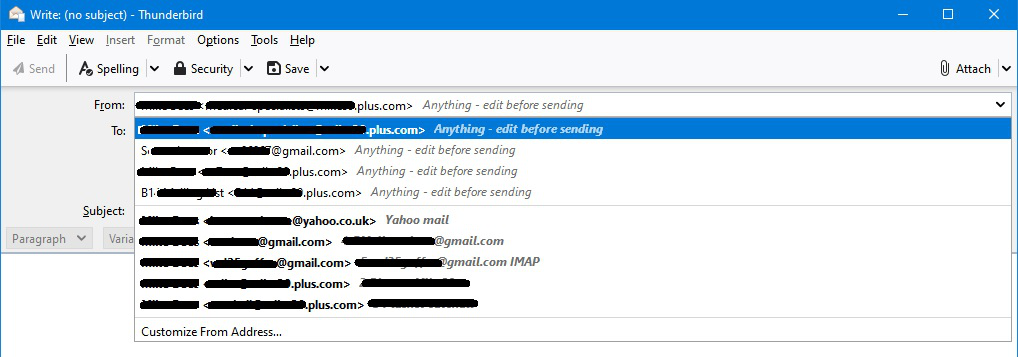
The correct default account is selected in Outgoing Servers. It sends from that account, but the default 'From' email address it uses is a customised one that I have used at some time in the past. I get a drop-down on the From: field as in the attached image.
The first 4 addresses listed are customised ones that I have used in the past (by clicking 'Customize From Address...'), they are not specified in the settings for any accounts. It defaults to the first one of those. The 5 addresses below that (starting with Yahoo) are the addresses associated with configured accounts. I want the From address to default to the correct address for the default account, not one of the previous custom addresses.
השתנתה ב־ על־ידי MikeBz
פתרון נבחר
OK I've found it. Matt's answer was close... Go to Account Settings, under the list of accounts on the left hand side there is a drop-down for Account Actions - select the account in the list that you want to be the default, then click the Account Actions drop-down and click Set as Default.