


displaying number of unread messages in inbox only

Hi,
I was wondering if there is a way for the main "account" folders to display the number or count of unread messages in the inbox only... rather than the total number of unread messages among all folders?
Thank you!
פתרון נבחר
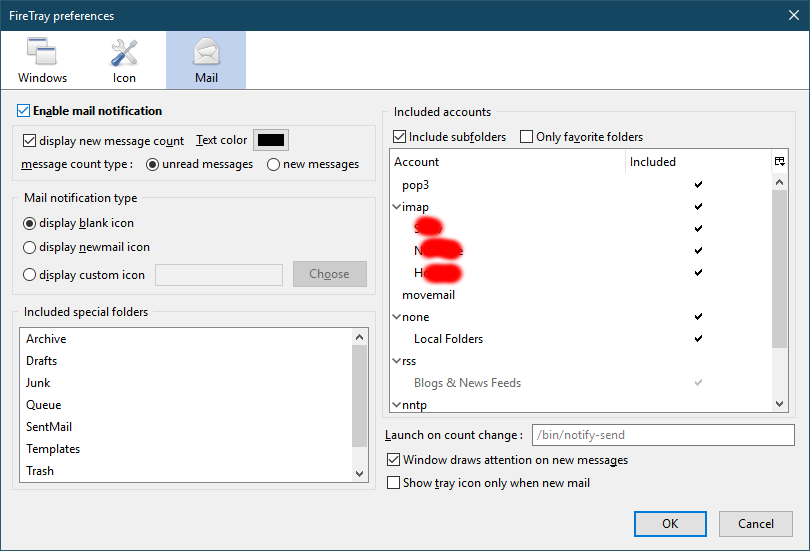
I noticed this discussion for the (discontinued) FireTray, that suggests it's possible to exclude subfolders from the new message notification. In fact, the options for the revived FireTray (see picture) suggests it's possible in the current version. If you prefer to name favourite folders, it's under the Edit menu.
https://support.mozilla.org/en-US/kb/installing-addon-thunderbird
כל התגובות (4)
If you right-click a folder, Properties, there's a box 'When getting new messages for this account, always check this folder'. Does unchecking the box for folders other than Inbox eliminate the count for those folders?
I use an add-on that displays the total count of unread Inbox messages, across all accounts, on the taskbar icon.
sfhowes,
Unfortunately that doesn't work. The folders were unchecked to begin with.
פתרון נבחר
I noticed this discussion for the (discontinued) FireTray, that suggests it's possible to exclude subfolders from the new message notification. In fact, the options for the revived FireTray (see picture) suggests it's possible in the current version. If you prefer to name favourite folders, it's under the Edit menu.
https://support.mozilla.org/en-US/kb/installing-addon-thunderbird
This does work... and is a good temporary solution. I do hope that Thunderbird might have an option in the near future to show different counts based on the user's preference.
Thank you for your help!