


Prioritize URLs on searches with the search bar

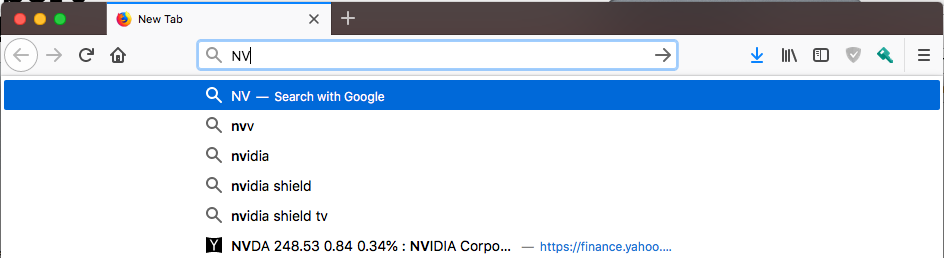
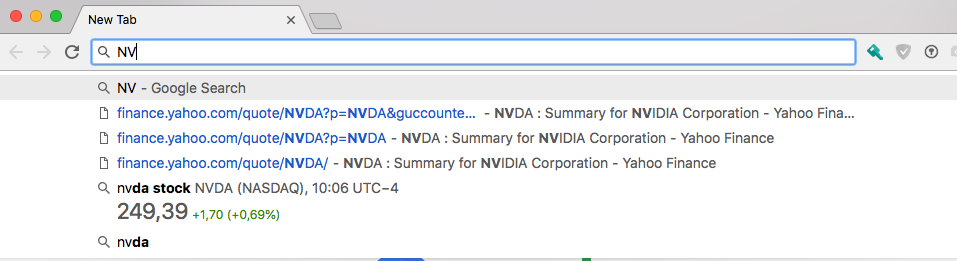
When I search for some terms in Firefox, the suggestions are firstly presented instead of the URLs. In Chrome, this is the other way around: URLs are firstly presented.
I took two screenshots that I attached to this message to illustrate my point.
I really like Firefox and have been a long time user and I would really like to fix that. I didn't find a way so far in about:config.
Any help? :)
השתנתה ב־ על־ידי Cesliens
כל התגובות (2)
פתרון נבחר
Hi, you may get what you want by doing this : Copy/Paste about:preferences#search into the Address Bar and Enter
Under Default Search Engine Put a tick in the box, add another tick , take away one till find right combination. https://support.mozilla.org/en-US/kb/search-suggestions-firefox
It is what it is as Firefox is not Google.
Please let us know if this solved your issue or if need further assistance.
Hi Pkshadow, Thanks a lot, it works perfectly ! Best, Cesliens