


How to sort every folder so the most recent message is on top?

How can I sort every folder so the newest e-mail is on top. I can not go through all my 200 folders and do it to each one. This is insanity!
כל התגובות (3)
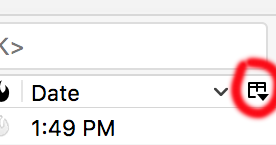
Pick one folder, sort it according to how you like. Look for the small icon at the right of the columns in the folder you sorted (see screenshot). Click on that icon, at it will let you apply this sorting to folders and/or subfolders. That should solve your problem.
This does not solve my issue. All this does is apply the selected columns in that folder to all the folder you choose (if you select the account is applies to all the folders in that account). Thats great to set the columns however, if you then go to another folder it is sorted oldest on the top and you have to scroll down to the newest.
How to I get every folder to have the newest item at the top of the list? I have never seen any other e-mail program not allow you to apply preferences to all folders. To me this seems like a common sense thing that most people would want but maybe I am a weirdo.
Hmm. I'm not sure. Try installing the conversations add-on, maybe.
Can someone else chime in.