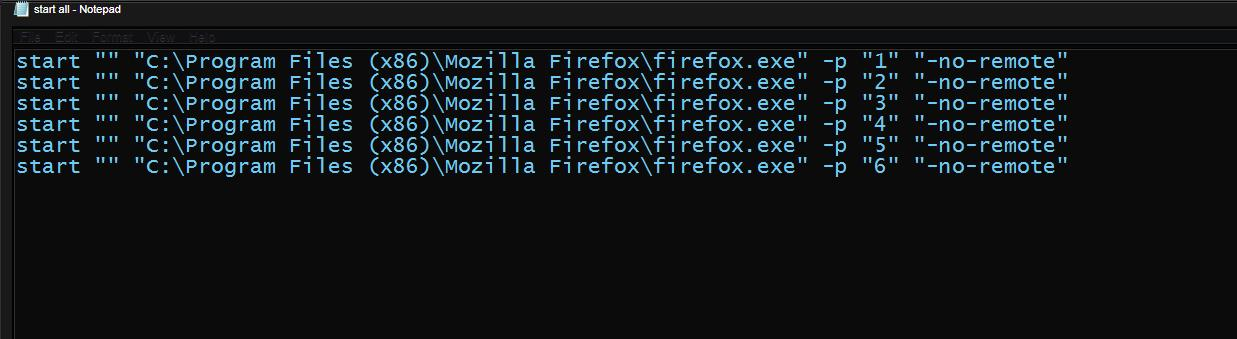
start all profiles with one click

Hi there I run a few profiles at once and use a bat file to start each user like this
@echo off set MOZ_NO_REMOTE=1 start "" "C:\Program Files (x86)\Mozilla Firefox\firefox.exe" -p set MOZ_NO_REMOTE=0
how can i set this to start all profiles at once rather then start each one at a time i have a new folder for each user
[General] StartWithLastProfile=0
[Profile0] Name=new IsRelative=1 Path=Profiles/new
[Profile1] Name=1 IsRelative=1 Path=Profiles/1 Default=1
[Profile2] Name=2 IsRelative=1 Path=Profiles/2
[Profile3] Name=3 IsRelative=1 Path=Profiles/3
Thanks for any help.
פתרון נבחר
Note that it is usually best to start the default profile without the -no-remote command line switch. That way you can open links from other applications (mail, Windows Explorer) in Firefox without getting an error.
See also:
The System Detail list shows that you run an older Firefox version that is no longer supported with security updates.
- It is important to update Firefox and add-ons to the latest versions to get all security fixes
Please update to the current Firefox 40.0.3 release.
- Help > About Firefox
כל התגובות (3)
-no-remote was added to Firefox many, many versions ago to replace the MOZ_NO_REMOTE command.
Example: "C:\Program Files (x86)\Mozilla Firefox\firefox.exe" -p -no-remote "Profile name"
פתרון נבחר
Note that it is usually best to start the default profile without the -no-remote command line switch. That way you can open links from other applications (mail, Windows Explorer) in Firefox without getting an error.
See also:
The System Detail list shows that you run an older Firefox version that is no longer supported with security updates.
- It is important to update Firefox and add-ons to the latest versions to get all security fixes
Please update to the current Firefox 40.0.3 release.
- Help > About Firefox
Thanks for your help this works