CSS/HTML rendering bug

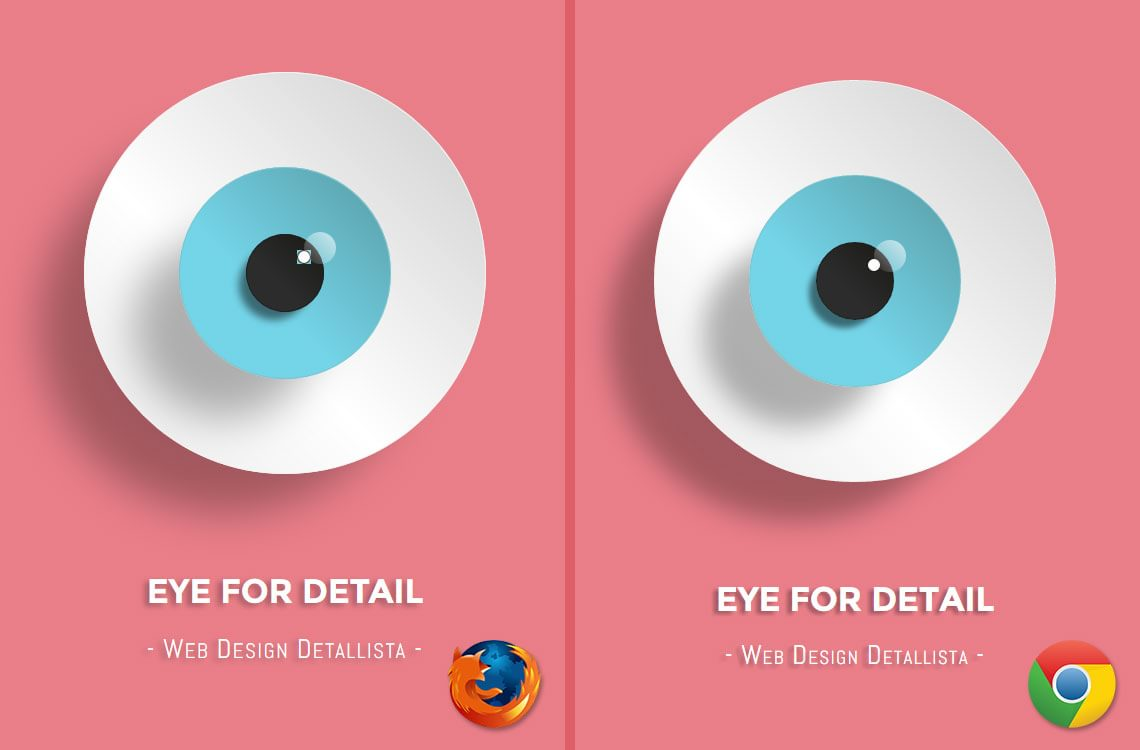
I created an HTML/CSS code for rendering some shapes. No Javascript. No images. Just plain HTML/CSS. The result displays a bug in an element, compared with Chrome. This is not the first time I'm getting this kind of errors in Firefox browsers. Other HTML/CSS elements created previously have rendering issues, but they seem fine in other browsers.
You can verify it here: http://codepen.io/doublecaffe/pen/QwmZJB
Image attached. I'm using Firebox v36, Firefox Developer Edition 37.0a2 and Chrome 40.0.2214.115 m. Any clue about this or fix in a future update?
Thx!
כל התגובות (2)
Please also provide this information in a bugzilla issue in this component:
Looks fine here in Firefox 36.
You can try to disable OMTC and leave hardware acceleration in Firefox enabled.
- about:config page: layers.offmainthreadcomposition.enabled = false
You can try to disable hardware acceleration in Firefox.
- Tools > Options > Advanced > General > Browsing: "Use hardware acceleration when available"
You need to close and restart Firefox after toggling this setting.