


Google advanced search has disappeared!

Recently, the Google advanced search option has disappeared from Firefox! It is still where it used to be in Inetrnet explorer: at the bottom of a search. What has happened, and what do I do, if I do not want to use Internet Explorer!
Ñemoĩporã poravopyre
when i try a search on google, the advanced search option is available trough the settings button on the right of the page (see screenshot).
Emoñe’ẽ ko mbohavái ejeregua reheve 👍 3Opaite Mbohovái (5)
hello petrea9, please try to clear the cache & cookies from google.com and reload the page.
Hello Philipp,
Now I tried yourt suggestion, alas without success!
Regards Petrea
Ñemoĩporã poravopyre
when i try a search on google, the advanced search option is available trough the settings button on the right of the page (see screenshot).
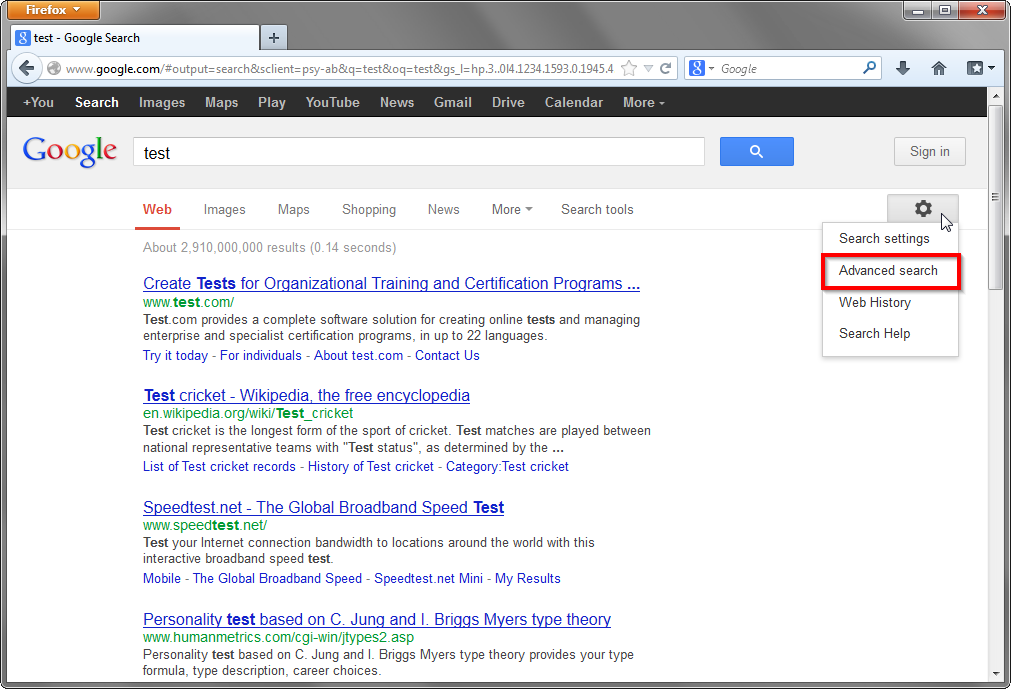
Ah, that's where they have moved it! (It used to be at the bottom of the search!)
Thanks a lot, Philipp

First you have to do the unadvanced search in the field which starts with a g in a blue square. When the search results come up there is the tools icon which looks like a wheel which you click on and scroll down to Advanced Search. Advanced searching cannot be done unless you first make the normal g-search because there is no tools icon until you have searched. That is why I was unable to do advanced searching with Firefox. Thank you Philipp for pointing the way.
Moambuepyre EdReff rupive