


I do not have a "Activate new device" option in the Sync menu on my desktop browser.

I do not have a "Activate new device" option in the Sync menu on my desktop browser.
How do I get it to appear?
When I go to Options - Sync - Manage Account I see:
View Quota Change Password My Sync Key Reset Sync Stop Using This Account
Opaite Mbohovái (2)
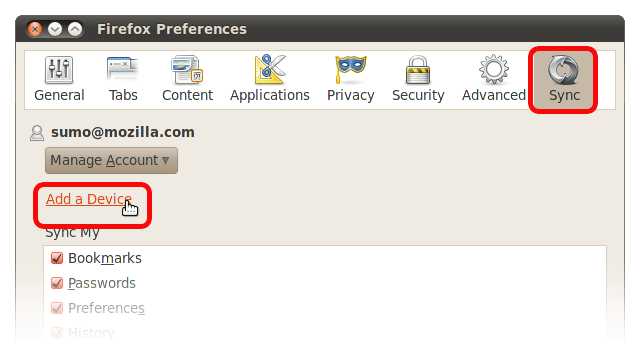
The "Add a device" link should appear right below the "Manage Account" button. If it is not there, make sure you have the latest version of the Firefox Sync add-on (or the latest version of Firefox 4 Beta).
Click on the image below for an illustration. For more details, see How do I add a device to Firefox Sync?
Moambuepyre Matt Brubeck rupive

Try Firefox's safe mode. I recall a user on chat having a problem with an extension or theme breaking the sync window. http://support.mozilla.com/en-US/kb/Safe+Mode