


Inbox folder has moved from top position.

The inbox folder has moved from it's top position down to the middle of the list. Thunderbird seems to offer no options for controlling folder order.
Opaite Mbohovái (10)
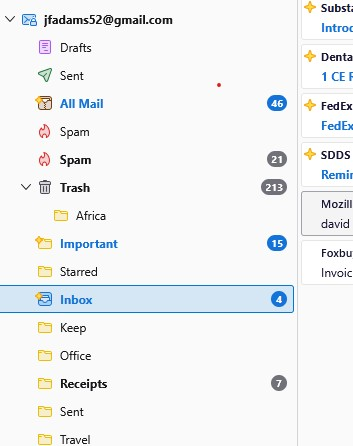

you should be able to left-click mouse and drag up. I just verified it. Good luck. :)
No, when I try to left click I get a red circle with the diagonal bar.
It started today when I was attempting to move an email message from the trash to the inbox.
John Adams said
Should vs. doesn't.
Are you dropping it on the space between the existing entries when the red circle goes away? the ability to drop changes as you pass each existing folder

Sorry if you've already solved this, but it was driving me nuts so I decided to look for and finally found a solution:
1. Right click (menu) on your email address (it's at the top of the folder column, the tree, or the hierarchy for that email address, I'm not sure of the correct terminology, but one of those should ring a bell.). 2. Left Click on "Reset Folder Order" (it's at the bottom of the menu items).
That should do it.
Thanks, I solved the problem as you described shortly after the last post. What is baffling is how I got into that situation be begin with.