


Repeated request for Google login for calendar

For the last two days, every time I start Thunderbird, a pop-up requests me to log in into Google Calendar. I have followed what little advice I can find:
- Unsubscribed/deleted all calendars
- Deleted all Gmail Accounts
- Deleted all saved passwords, and re-entered them only for my current email accounts.
How do I get rid of this irritating and unnecessary pop-up? I have updated to v128.14 but the problem persists.
Thanks in advance.
John
Ñemoĩporã poravopyre
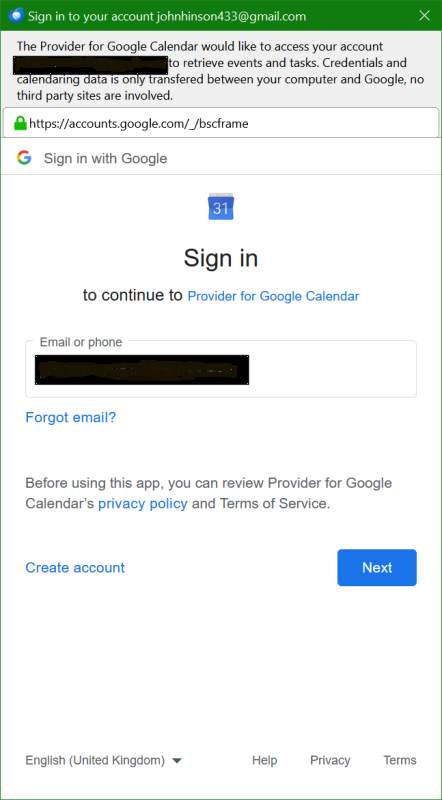
It says "Provider for Google Calendar" that is an addon you have installed. If you no longer wish to use it, I suggest you uninstall it.
Opaite Mbohovái (13)
What makes you think it is a calendar? It could just as well be an address book.
Commonly Google accounts add a calendar and an address book along with the mail account. Sometimes more than one calendar.
Because it says so. :) See attached.
As far as I know, Google does not have any access to my address book, I have certainly not authorised that. The address book is not co-ordinated or shared with other devices.
John
Ñemoĩporã poravopyre
It says "Provider for Google Calendar" that is an addon you have installed. If you no longer wish to use it, I suggest you uninstall it.
Spot on! Thanks.
I thought I read it was integrated as part of Thunderbird now, evidently not.
Many thanks indeed, glad to have got rid of that.
John
I am having the same problem. It started recently. I use the Tbird calendar but don't want to have to sign in every time I start my computer. How do I fix this?
Check your addons. The above solution resolved the issue for me. It appears to have been an add-on required at one time for the Calendar to work, but is no longer.
I removed it and the problem is long gone.
John
John, I removed that extension ages ago when it was no longer needed. I have not added any new extensions. As I stated, this just started happening a week or so ago.
OK, fair enough. I'm sorry but I don't think I have the knowledge to help you further on this - hopefully one of the specialists on here can do so. But meanwhile I would recommend you post a screen shot (blanking out any personal information) as that may help.
Good luck.
John
It's the same screen shot that is posted above by Matt.
I am puzzled - because if you are getting exactly that message, the implication is that the "Provider for Google Calendar" extension is still installed.
Please also see: https://support.google.com/calendar/thread/15565416/how-do-i-disable-provider-for-google-calendar-s-constant-requests-for-access?hl=en
I notice there that it refers to it not being compatible with newer versions of Thunderbird.
John
Sorry, yes it is installed. But when I disable it I lose all but one of my calendars. And today it didn't ask for credentials when I started Tbird.
Great that things are working today!
If it occurs again, you would really need to take it up with whoever built the extension as it seems (from that link I gave you) it needs some updating to be comaptible with the currunt version of Thunderbird.
John
Ellaryk said
Sorry, yes it is installed. But when I disable it I lose all but one of my calendars. And today it didn't ask for credentials when I started Tbird.
That addon is old, it is used now for the sole purpose of syncing tasks. The native calDav does not sync tasks as there is actually no standards definition of a task as there is for contacts (cardDav) and calendars (calDav) So if you need to have tasks, you still need the provider addon. One of the things about the addon is that it has to be updated for every new release of Thunderbird. Generally the developer makes the release available in time, but it does not update when Thunderbird updates, Thunderird looks for update after it's next start and often can not do the updater until after the next, so if you are using the provider addons restart Thunderbird three times after each update before looking at your calendars, and even then, check in the addon manager that the version of the addon installed is the latest.
Note if you remove the addon and add your calendars again (they are syncronised to google so data loss is not an issue) then you will loose synced tasks in the process, but all they messing around will be done once and for all.