


Windows 10 reached EOS (end of support) on October 14, 2025. For more information, see this article.

Eheka Pytyvõha

Emboyke pytyvõha apovai. Ndorojeruremo’ãi ehenói térã eñe’ẽmondóvo pumbyrýpe ha emoherakuãvo marandu nemba’etéva. Emombe’u tembiapo imarãkuaáva ko “Marandu iñañáva” rupive.

Kuaave

Not being prompted to upgrade Thunderbird !!

  • Mbohavai’ỹre
  • 0 oguereko ko apañuãi

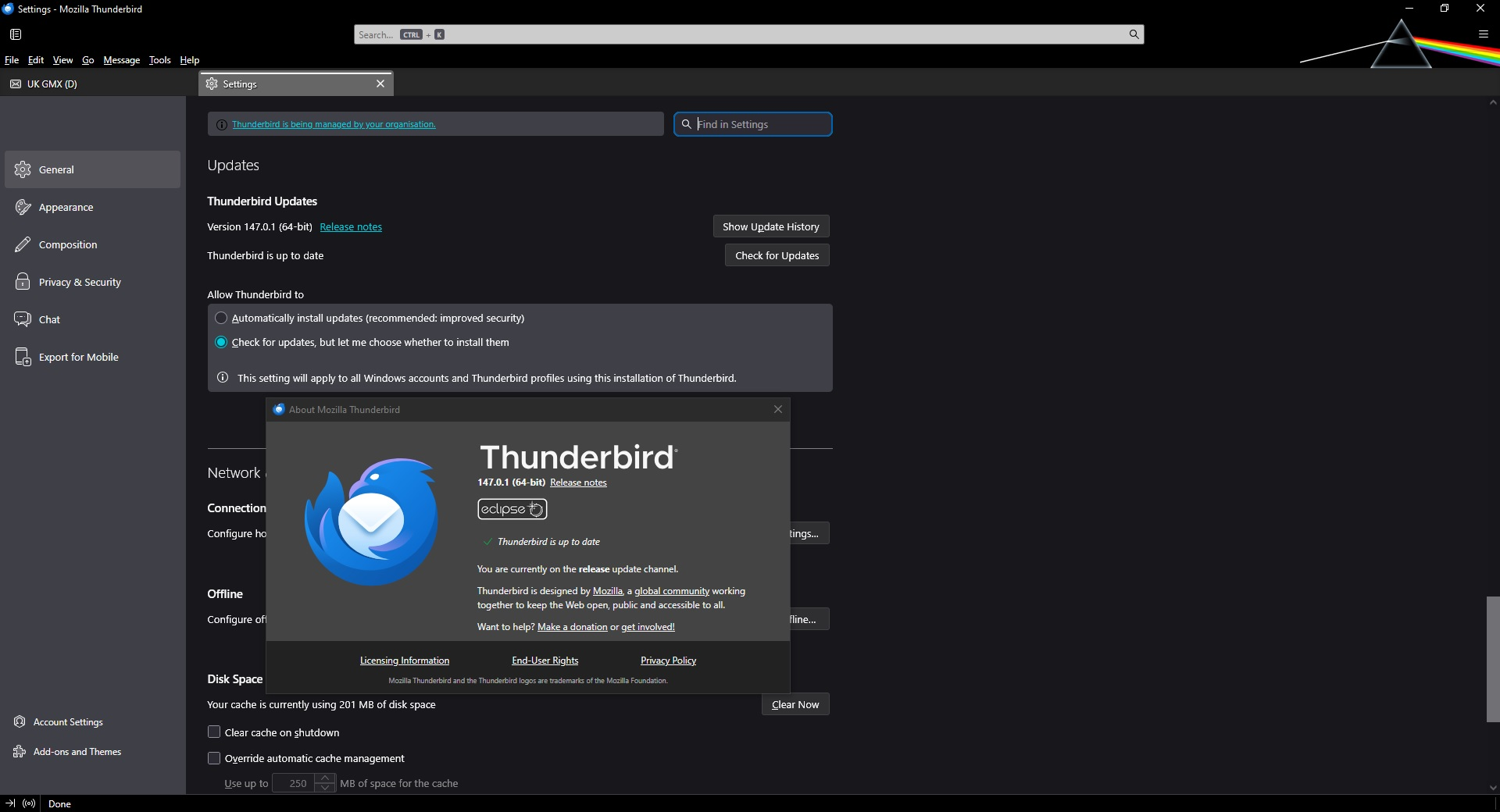
When there is an update available for Thunderbird, I no longer get the prompt window automatically opening to tell me.

I have my Settings, General, Updates set to Check for updates, but let me choose whether to install them. (see attached screenshot)

This worked in the past but after an update (can't remember which one), this stopped working.

I have my Update Settings set in Firefox to the exact same and it always automatically opens a prompt window when there is an update due, as does all my other software, so is there something set differently in my Firefox settings compared to my Thunderbird settings?

Is there something in the Firefox about:config settings that is possibly switched on but it is not switched on in Thunderbird about:config settings that is preventing Thunderbird automatically opening an update window?

Is there something different in the registry entries or values in a file?

I know that I can manually select Help, About Thunderbird and the prompt window will show any updates available but we don't always remember to check and that's why the automatic prompt works so well!

I am running Thunderbird Version 147.0.1 (64-bit) currently on the release update channel.

Any suggestions would be helpful.

Thanks.
When there is an update available for Thunderbird, I no longer get the prompt window automatically opening to tell me. I have my Settings, General, Updates set to Check for updates, but let me choose whether to install them. (see attached screenshot) This worked in the past but after an update (can't remember which one), this stopped working. I have my Update Settings set in Firefox to the exact same and it always automatically opens a prompt window when there is an update due, as does all my other software, so is there something set differently in my Firefox settings compared to my Thunderbird settings? Is there something in the Firefox about:config settings that is possibly switched on but it is not switched on in Thunderbird about:config settings that is preventing Thunderbird automatically opening an update window? Is there something different in the registry entries or values in a file? I know that I can manually select Help, About Thunderbird and the prompt window will show any updates available but we don't always remember to check and that's why the automatic prompt works so well! I am running Thunderbird Version 147.0.1 (64-bit) currently on the release update channel. Any suggestions would be helpful. Thanks.
Mba’erechaha japyhypyre oñondivegua

Nde eikéke nde mba’etepe embohovái hag̃ua ñe’ẽmondo. Ikatúpa, emoñepyrũ peteĩ porandu, ndereguerekói gueteriramo nemba’ete.