

Ko téma oñeñongatúma.
Ejapo porandu pyahu eikotevẽramo pytyvõ.

Ñongatupyre
Change Background/Highlight Color of Unread Messages?

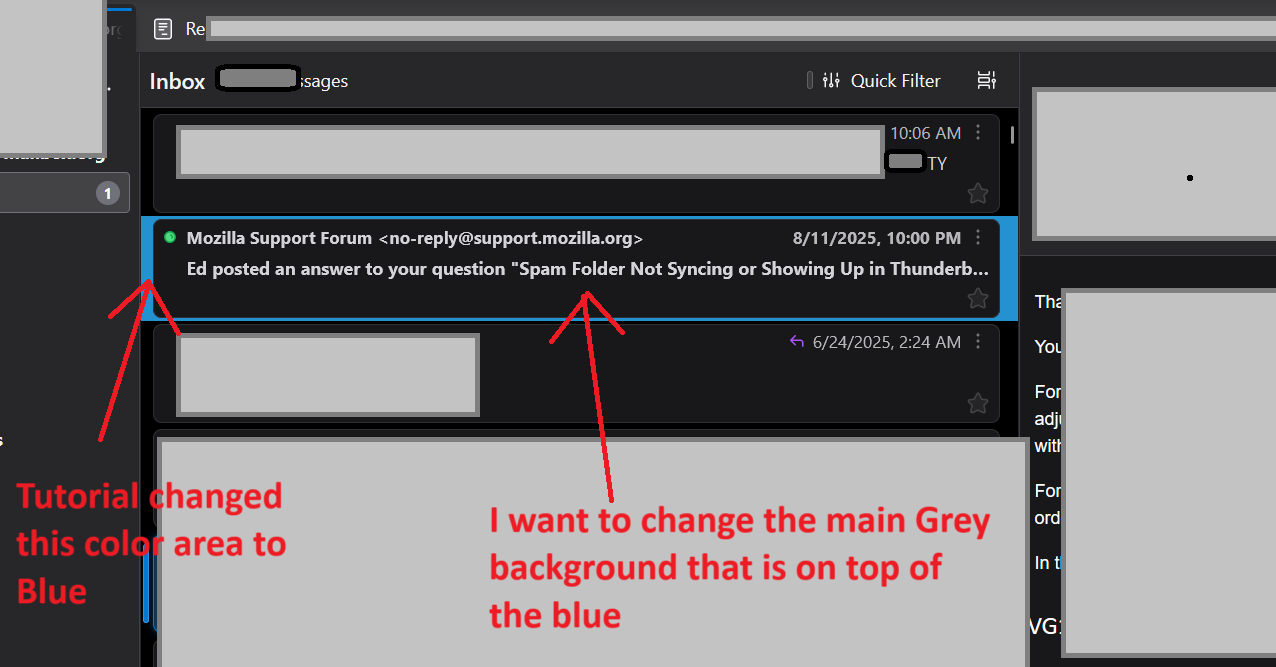
I found multiple tutorials to change the font color, and the back-background color, but not the actual primary background area in my screenshot. https://support.mozilla.org/en-US/questions/1441429#question-reply This one changes the Font color: color: #2492d1 !important;
This changed the far back background color, not primary background: background-color: #2492d1 !important;
I found multiple tutorials to change the font color, and the back-background color, but not the actual primary background area in my screenshot. https://support.mozilla.org/en-US/questions/1441429#question-reply
'''
This one changes the Font color:'''
color: #2492d1 !important;
'''This changed the far back background color, not primary background:'''
background-color: #2492d1 !important;
Opaite Mbohovái (1)
Solved! The Code for the File (using the linked tutorial) is this to change background color:
@import url("chrome://messenger/content/unifiedtoolbar/unifiedToolbarWebextensions.css");
/* Set colour of unread in thread pane/message list */
- threadTree tbody [data-properties~="unread"] {
.tree-table,
.card-container {
background-color: #012a60 !important;
}