


Functionality "Delete messages older than X days" doesn't work

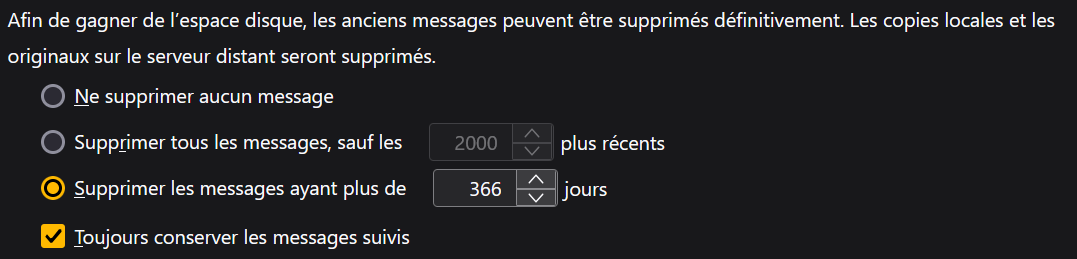
Using the french version of Thunderbird 128.5.2esr (64 bits), I set, in the settings, the following options for one of my accounts (see picture): "Delete messages older than X days" "Always keep starred messages"
However, just after this setting change, I closed and reopend Thunderbird, and all messages older than X days are still there.
What should I do?
Ñemoĩporã poravopyre
The emails are only in the folder "All messages".
Ahh… This is a Gmail account, right? Now, that's some relevant information you didn't mention before…
Gmail doesn't work like a normal IMAP server would, and one of its many particularities is that mail clients cannot directly remove mail from the All Mail folder. You may accomplish that indirectly by moving the messages to Bin/Trash first (has to be the same Bin/Trash as the one used by Gmail for this to work), and then remove the messages from there or just let Gmail automatically do that after 30 days.
If you want to remove the messages directly from there without having to move them to Bin/Trash first, you can only do that from Gmail, cannot do it with Thunderbird or any other mail client.
Emoñe’ẽ ko mbohavái ejeregua reheve 👍 1Opaite Mbohovái (4)
re: Delete messages that are older than 366 days
What happens if you compact the folders in that account ?
Are the emails in various folders or just Inbox? If only 'Inbox' and Imap account: In 'Server Settings' have you also selected to Clean up (Expunge) Inbox on Exit ?
It doesn't work when I compact the folders in that account
The emails are only in the folder "All messages".

Ñemoĩporã poravopyre
The emails are only in the folder "All messages".
Ahh… This is a Gmail account, right? Now, that's some relevant information you didn't mention before…
Gmail doesn't work like a normal IMAP server would, and one of its many particularities is that mail clients cannot directly remove mail from the All Mail folder. You may accomplish that indirectly by moving the messages to Bin/Trash first (has to be the same Bin/Trash as the one used by Gmail for this to work), and then remove the messages from there or just let Gmail automatically do that after 30 days.
If you want to remove the messages directly from there without having to move them to Bin/Trash first, you can only do that from Gmail, cannot do it with Thunderbird or any other mail client.
Alright, thank you for your help