

Ko téma oñeñongatúma.
Ejapo porandu pyahu eikotevẽramo pytyvõ.

Moĩporãmbyre
Ñongatupyre
Thunderbird 'Sent' issue

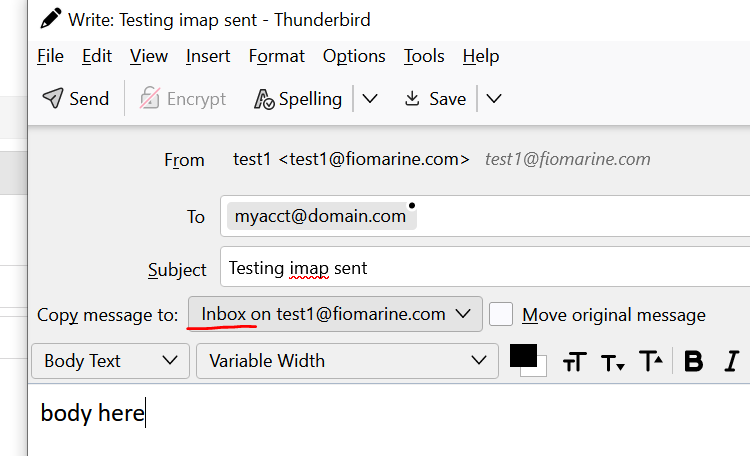
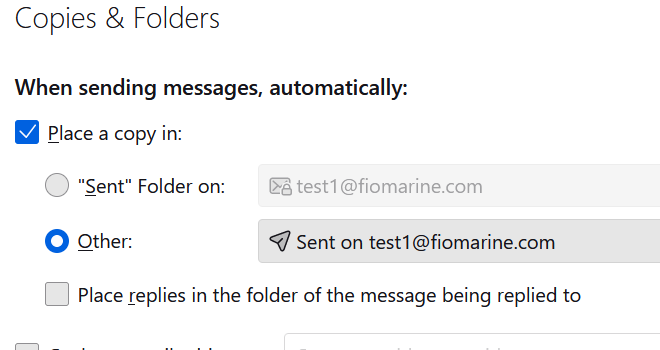
Thunderbird IMAP Account Setting, Copies & Folders, When sending messages automatically... is set to 'Other' - "Sent on myacct@domain" per image, (or even if set to the normal "Sent Folder on: ") but when I reply or start new email the new message window has a dropdown with a default setting as inbox (per image). I have to manally select 'Sent' folder each time. What's going on ?
Thunderbird IMAP Account Setting, Copies & Folders, When sending messages automatically... is set to 'Other' - "Sent on myacct@domain" per image, (or even if set to the normal "Sent Folder on: ") but when I reply or start new email the new message window has a dropdown with a default setting as inbox (per image). I have to manally select 'Sent' folder each time. What's going on ?
Opaite Mbohovái (2)
Ñemoĩporã poravopyre
It looks like you're using the Copy Sent to Current add-on. Remove or disable the add-on if you want the Copies & Folders setting to apply.
Thanks so much, don't recall installing that one. Thunderbird is awesome.