

Windows 10 reached EOS (end of support) on October 14, 2025. If you are on Windows 10, see this article.

Eheka Pytyvõha

Emboyke pytyvõha apovai. Ndorojeruremo’ãi ehenói térã eñe’ẽmondóvo pumbyrýpe ha emoherakuãvo marandu nemba’etéva. Emombe’u tembiapo imarãkuaáva ko “Marandu iñañáva” rupive.

Kuaave
Ñongatupyre

Damaged / Corrupted Folder

ombohovái Ojapo 3 ary
Thomas J Meehan

The problem I am requesting assistance with is that a number of my mail folders have been "corrupted/damaged". Once a folder is "damaged" I can no longer delete or rename the folder.

The icons for mail folders are normally displayed as yellow. I can delete and rename these "normal" folders using the menu displayed by a right click or by changing the name in the "Properties" name field menu.

A visible clue that a folder is "damaged" is that the folder icon is displayed as purple instead of yellow. When I right click on a "damaged" folder the options to delete and rename do not' appear in the menu displayed. Additionally I can not change the name of the folder by changing the content of the name field in the "Properties" menu, I have tried to use the repair option that is displayed in the "Properties" menu, but has no effect.

I am running the most recent level of Thunder (102.14.0 (64-bit) on a Surface machine running Windows 11 Home, Verson 22H2, OS Build 22621.1992. Any assistance welcome. Tx Tom Thomas J Meehan [removed emails from public]

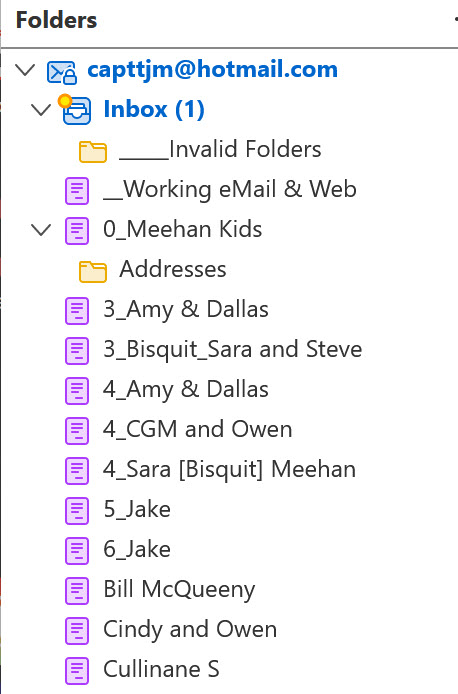
The problem I am requesting assistance with is that a number of my mail folders have been "corrupted/damaged". Once a folder is "damaged" I can no longer delete or rename the folder. The icons for mail folders are normally displayed as yellow. I can delete and rename these "normal" folders using the menu displayed by a right click or by changing the name in the "Properties" name field menu. A visible clue that a folder is "damaged" is that the folder icon is displayed as purple instead of yellow. When I right click on a "damaged" folder the options to delete and rename do not' appear in the menu displayed. Additionally I can not change the name of the folder by changing the content of the name field in the "Properties" menu, I have tried to use the repair option that is displayed in the "Properties" menu, but has no effect. I am running the most recent level of Thunder (102.14.0 (64-bit) on a Surface machine running Windows 11 Home, Verson 22H2, OS Build 22621.1992. Any assistance welcome. Tx Tom Thomas J Meehan [removed emails from public]
Mba’erechaha japyhypyre oñondivegua

Moambuepyre James rupive

Opaite Mbohovái (1)

One possibility would be to upgrade to the release version, which is 115. That's no guarantee of a fix for your issue, as I have not encountered others reporting that problem.