


Windows 10 reached EOS (end of support) on October 14, 2025. If you are on Windows 10, see this article.

Eheka Pytyvõha

Emboyke pytyvõha apovai. Ndorojeruremo’ãi ehenói térã eñe’ẽmondóvo pumbyrýpe ha emoherakuãvo marandu nemba’etéva. Emombe’u tembiapo imarãkuaáva ko “Marandu iñañáva” rupive.

Kuaave
Oĩporãmava Ñongatupyre

windows grou policy to block all websites

paulmrenzulli

I am using the group policy that Mozilla created and I can block individual websites, but I have been tasked to block all but 1 website. The server is a windows server 2012 and it will be used by multiple people at the same time with separate autonomous desktops. Also known as a terminal server or a remote desktop services host. Because of the fabric of our environment I have to use group policy to perform this. Can I do this, and how can I accomplish this through Firefox group policy? The attached picture is a copy of my attempt of blocking all of the sites.
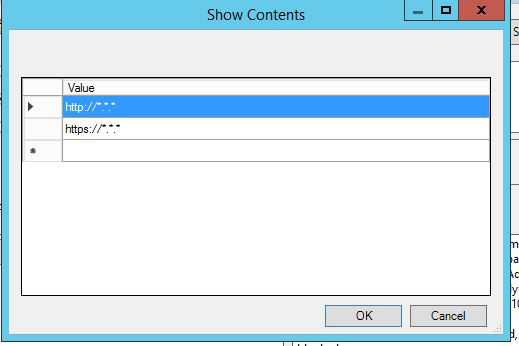
I am using the group policy that Mozilla created and I can block individual websites, but I have been tasked to block all but 1 website. The server is a windows server 2012 and it will be used by multiple people at the same time with separate autonomous desktops. Also known as a terminal server or a remote desktop services host. Because of the fabric of our environment I have to use group policy to perform this. Can I do this, and how can I accomplish this through Firefox group policy? The attached picture is a copy of my attempt of blocking all of the sites.
Mba’erechaha japyhypyre oñondivegua

Opaite Mbohovái (2)

Ñemoĩporã poravopyre

You can block every website by adding <all_urls> to the blocked websites policy. Then, to add the 1 website that you are permitting, you would add that to the website filter exceptions list.

Hope this helps.

Thank you, that worked great!