


Can I lock the layout in Thunderbird?

My elderly father keeps accidentally hitting buttons in Thunderbird that changes the layout and other view options. Is it possible to lock these formatting options so that a user cannot change them?
Opaite Mbohovái (5)
There are add-ons that deal with specific items, such as No Message Pane Sort (which actually works for the Threads Pane), and you can hide toolbars from the View menu. Entire menus and submenus can be hidden with the use of userChrome.css.
If you set a layout and want to back it up in case it's changed, copy the xulstore.json file in the profile folder.
Thanks for your reply. This add-on only disables sorting columns, but not the ability to click other things under view -> toolbars and view -> layout, or grabbing the the lines btwn panes and moving those
You may need to use the info in the userChrome.css link provided by sfhowes.
Specifically...if you want to remove the 'Toolbars' and 'Layout' items from the 'View' option then do this.
In Thunderbird:
- Help > Troubleshooting Information
- click on 'Open folder' button
a new window opens showing the contents of your Profile folder.
- Close Thunderbird now - this is important.
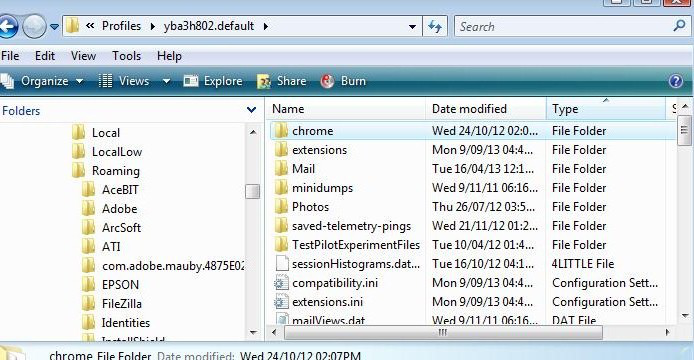
- Create new folder and call it chrome note the spelling - use a lower case 'c' It should be in the same place as the 'Mail' folder. See image below as guide.
- open Notepad
- Copy everything - all the text between lines below and paste it into the Notepad document.
/*

* Do not remove the @namespace line -- it's required for correct functioning
 */

@namespace url("http://www.mozilla.org/keymaster/gatekeeper/there.is.only.xul");

/* Hide menu items */
menu[label="Toolbars"],
menu[label="Layout"]
{display: none !important;}
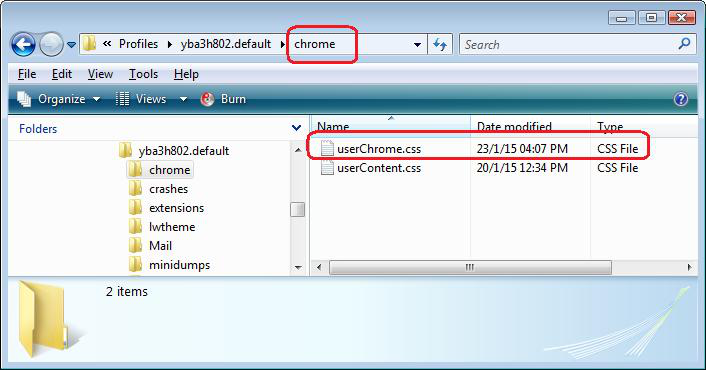
- Save the document as filename userChrome.css in the 'chrome' folder. Note the spelling all lower case except for the 'C'.
See image below as guide.
Start Thunderbird.
Under 'View', Toolbars and Layout should not be an option.
Please note: It has been known that when code is entered for copying in this forum, the email sent to you may not have the complete code. The part that says !important is often missing. So please view the correct posted comment in the forum question to double check the code before saving the 'userChrome.css' file.
Thanks, I'll try that.