


Firefox is not "repainting" when another open window is moved across in front of it
This issue has been going on for a while now, through several versions since about 59 or so. I'm running Windows 7 Home Premium on a Very fast computer with 8 Gigs of ram.
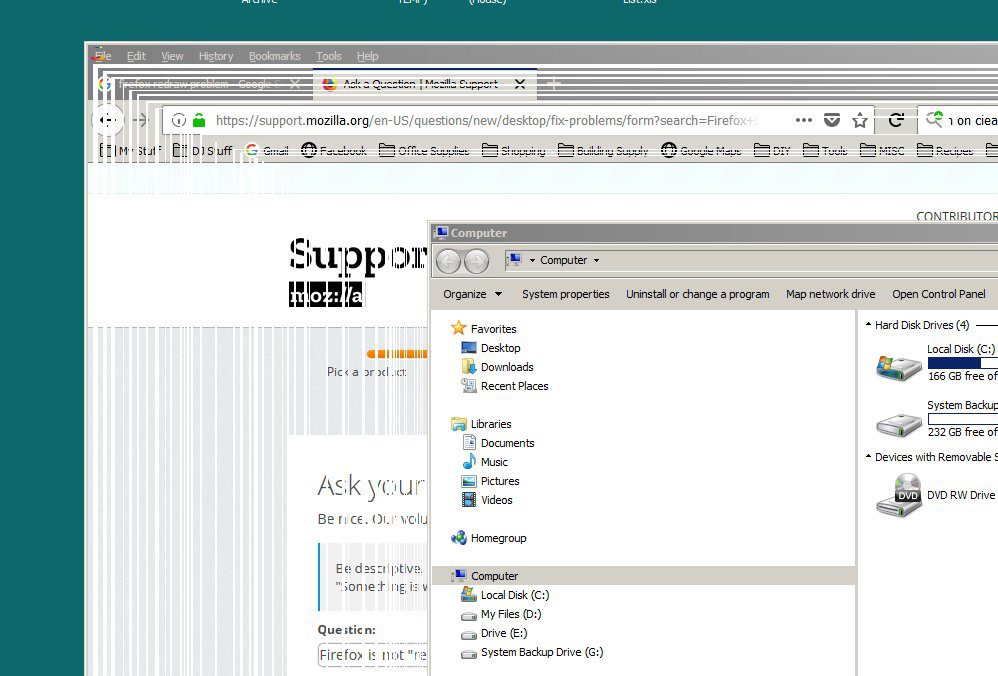
The issue is that when Firefox is open and I drag another open window in front of it, it leaves white lines and stripes of varying widths, like "ghost trails" from the trailing edges, across the Firefox window below. (see photo) Those lines stay there until I click on the Firefox window, bringing it to the top. Then the window's border and menu bar will repaint, but the window content itself doesn't until I click the top title bar and start to drag the window.
This only happens to Firefox, and not with any other open windows or applications at all. It also doesn't matter what open window is being dragged in front of it, whether is a file explorer window or another program app.
I've read up on other "repainting" issues, but this seems to be different and non of the other solutions seem to have any affect. Not enabling or disabling Hardware Acceleration, or turning Clear Type on or off.
Any ideas would be greatly appreciated. Thanks
FYI... I tried adding the picture, but the little image upload box below just has the wheel spinning for the last 20 minutes. So, if the image doesn't show, then it must not have uploaded for some reason. Going to click "Post Question" now. Hope it works.
Ñemoĩporã poravopyre
Okay.... So, it appears to be working fine now with Hardware Acceleration turned off (unchecked) in Firefox Performance Settings.
Apparently, while I was trying it with all the different settings before, I was not aware that Firefox had to be shut down and restarted every time I made a change to that setting, so they were not actually being changed.
Everything is great now. Thanks SO much for the help. Very much appreciated.
Emoñe’ẽ ko mbohavái ejeregua reheve 👍 0Opaite Mbohovái (5)
Okay, so the image didn't load above, so I tried again and it worked this time.
Hi, 8gigs is really not that much these days, but how much ram is your video card ATI Radeon 3000 Graphics, Release date: 2007 have since it is 14yrs old Is this a onboard chip or a separate card ?
URL for your drivers if this is integrated as all that will turn up : https://www.amd.com/en/support/graphics/integrated-motherboard-graphics/ati-radeon-3xxx-series/ati-radeon-3000
Do not see any errors in your Video drivers I do think time has caught up with the card though.
Multi-Processor Support : Go to the 3 Bar Menu then Options --> General --> Performance and untick everything. change the recommended size lower then see how it runs. Note: 1 = No Multiprocessor = slow again. Try 2 Restart Firefox after making these changes please. Note : Hardware Acceleration is for Video Card, Monitor to see if remain off or to turn back on.
Only Disable as last resort.
Multi-processor Can completely disable it this way in about:config : dom.ipc.processCount set to 1 browser.tabs.remote.autostart = false browser.tabs.remote.autostart.2 = false
Only move to esr if low ram and old system.
Firefox Extended Release Version : Firefox ESR does not come with the latest features but it has the latest security and stability fixes.
If do please :
Thanks for the help Pkshadow, although, some of what you wrote may be a somewhat beyond my tech level and parts are a bit cryptic.
I built this PC about a year ago with all new parts. I realize it wasn't cutting edge stuff but it's lightning fast and light years ahead of what I was using before. I'm not a gamer or anything, so the FX 6300 six core with 8 gigs of ram more than suits my needs. When I first powered it up, it searched for the most updated drivers, so I don't think it's a driver issue. Especially since it only does this with Firefox.
The interesting thing I also noticed is that it does Not do it if I drag a Firefox window across another window with Firefox in it. Only with a window with something other than Firefox in it. So, this seems to be something with Firefox and not the computer hardware or settings itself.
It's using the onboard video so there's no separate card. Is that what you mean when you say, "hardware acceleration is only for the video card"? Does that mean it does nothing for onboard video?
I've tried all the different Performance settings in Firefox, but nothing seems to make any difference. As for all the things you listed about Multi-Processors, I'm afraid that's a bit above my understanding.
Hi, ya old card but if new should work it also still has windows 10 drivers for it.
No Hardware Acceleration is located as per directions with in Firefox and it is used to accelerate video card hardware https://en.wikipedia.org/wiki/Hardware_acceleration so that could be the issue, try as said with out it on and monitor.
As to the post and directions that is as simple as can be made. If have questions ask.
Go to the place and turn down the processors being used as Firefox Quantum is multi core (processor). So it may need to be toned down for this older card. You can see this processes working in Windows Task Manager as Firefox main program, Audio/video sandbox, Extensions Count up how many gigs are being used in WIn7. (win 10 shows) If not enough left over turn it down or turn it up.
Ñemoĩporã poravopyre
Okay.... So, it appears to be working fine now with Hardware Acceleration turned off (unchecked) in Firefox Performance Settings.
Apparently, while I was trying it with all the different settings before, I was not aware that Firefox had to be shut down and restarted every time I made a change to that setting, so they were not actually being changed.
Everything is great now. Thanks SO much for the help. Very much appreciated.