


New version of Acrobat installed and Firefox does not open pdf's off a website

Acrobat required a new version of Adobe to be installed yesterday and while it works in all other respects, selecting a pdf link on a web site does not open the pdf in a new window but saves the document to my Downloads folder on the PC. IE does not have this problem.
Ñemoĩporã poravopyre
My last eMail from Adobe was July 10th. That's the last 'Security' Update from them according to their Website: Adobe. The 'Acrobat Reader DC' auto-updates itself (Continuous Release). Mine shows '2018.011.20055' as the most recent.
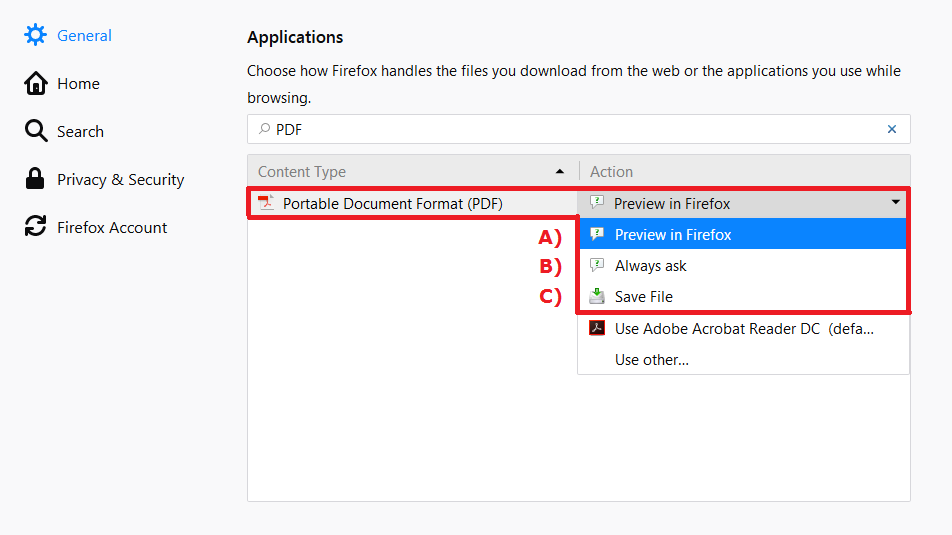
Look in Options / General / Applications.
Type PDF in the Applications Search Box.
You have 3 choices.
~Pj
Emoñe’ẽ ko mbohavái ejeregua reheve 👍 0Opaite Mbohovái (2)

Ñemoĩporã poravopyre
My last eMail from Adobe was July 10th. That's the last 'Security' Update from them according to their Website: Adobe. The 'Acrobat Reader DC' auto-updates itself (Continuous Release). Mine shows '2018.011.20055' as the most recent.
Look in Options / General / Applications.
Type PDF in the Applications Search Box.
You have 3 choices.
~Pj

Problem solved. The new version of Adobe changed the file association to download rather than open the file in a new window as it had previously been set.