


A quick way to move messages to folders
I've set up filters for my regular correspondents - which is great. But I need something quick for one-offs or other odd emails. I'm used to using GMail, where I hit the "Move" icon and type in enough characters that it highlights the appropriate folder in the folder list, I just hit Return, and - bang. So far in TBird, the only way I've found to move a msg is Pull down <Message<, select Move To >, select the email account, and then manually navigate through the whole file system I have set up to locate the appropriate folder. Is there a quicker way?
Ñemoĩporã poravopyre
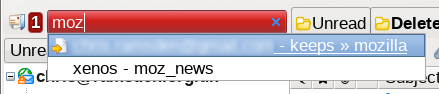
I use the QuickFolders add-on, which offers a quick jump feature. Select your message(s), press shift+m and a dialogue box opens. You type into this some part of the name of the folder you're looking for and a list of matching folders appears.
There used to be an add-on named quickfoldermove or similar but I haven't seen it around for some time.
The basic version of QuickFolders can be downloaded for free, but to get this particular feature you'll need to pay for the "Pro" version. IMHO it is money well spent.
Emoñe’ẽ ko mbohavái ejeregua reheve 👍 1Opaite Mbohovái (6)

Drag and drop?
Good suggestion! But I've got over 100 folders for individual clients, so often quite a bit of scrolling. Plus many client folders have subfolders. Quite tricky to drag and drop..
Ñemoĩporã poravopyre
I use the QuickFolders add-on, which offers a quick jump feature. Select your message(s), press shift+m and a dialogue box opens. You type into this some part of the name of the folder you're looking for and a list of matching folders appears.
There used to be an add-on named quickfoldermove or similar but I haven't seen it around for some time.
The basic version of QuickFolders can be downloaded for free, but to get this particular feature you'll need to pay for the "Pro" version. IMHO it is money well spent.
Brilliant - thanks so much for this!
Best method I've found to move messages to folders is addon "Archive This". You set up a list of rules - if sender/subject/receiver is this, then move it to folder that. I can even move to a folder in another mail account. You can set up any key shortcuts you want. I set Ctrl+Alt+0 to run the filters, then use one of my mouse buttons to simulate that key. Of course you can still automatically move messages to folders as they arrive using Tbird filters - if that works better for your situation.