


Windows 10 reached EOS (end of support) on October 14, 2025. If you are on Windows 10, see this article.

Eheka Pytyvõha

Emboyke pytyvõha apovai. Ndorojeruremo’ãi ehenói térã eñe’ẽmondóvo pumbyrýpe ha emoherakuãvo marandu nemba’etéva. Emombe’u tembiapo imarãkuaáva ko “Marandu iñañáva” rupive.

Kuaave
Oĩporãmava Ñongatupyre

How to get Thunderbird to use a specific address book?

Queenmab100

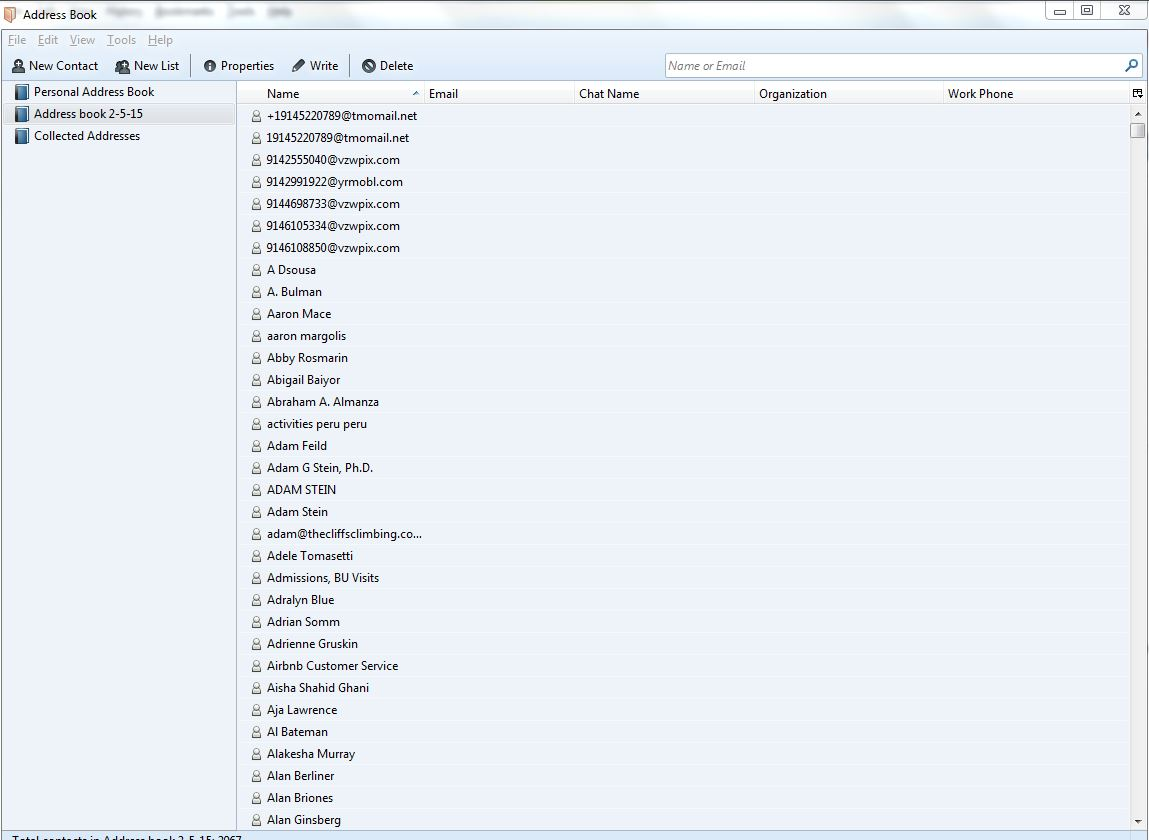
I imported my address book from Windows Live Mail. to Thunderbird When I click on "address book" in Thunderbird, it shows me 3 different address books - 'personal address book' (which is empty), 'address book 2-5-15' (which is the one I imported) and 'collected addresses' (which is the emails it has collected so far from emails I sent in the last couple of days since switching to Thunderbird). When I am creating a new email, how can I get Thunderbird to look at 'address book 2-5-15'? I have over 2000 contacts in there but I can't figure out how to get Thunderbird to use it!  :-(

See screenshot attached.
I imported my address book from Windows Live Mail. to Thunderbird When I click on "address book" in Thunderbird, it shows me 3 different address books - 'personal address book' (which is empty), 'address book 2-5-15' (which is the one I imported) and 'collected addresses' (which is the emails it has collected so far from emails I sent in the last couple of days since switching to Thunderbird). When I am creating a new email, how can I get Thunderbird to look at 'address book 2-5-15'? I have over 2000 contacts in there but I can't figure out how to get Thunderbird to use it! :-( See screenshot attached.
Mba’erechaha japyhypyre oñondivegua

Opaite Mbohovái (2)

Ñemoĩporã poravopyre

Well, the column where email addresses should appear is empty, so it seems to have been a faulty or incomplete import.

Ah, thank you! I had not noticed that. I re-imported with correct columns and it's working now.