


Download of new dictionary in Thunderbird does not work

After attempting to install a new dictionary in Thunderbird under tools-options-composition-spelling-download more dictionaries, after pressing download on the selected dictionary nothing happens. I have Windows 8.0 and a new laptop with Windows 8.1 in which Thunderbird can't download a new spell check dictionary neither.
The following is the info off my Windows 8.0 PC
Application Basics
   Name: Thunderbird
   Version: 31.0
   User Agent: Mozilla/5.0 (Windows NT 6.2; WOW64; rv:31.0) Gecko/20100101 Thunderbird/31.0
   Profile Folder: Show Folder
             (Local drive)
   Application Build ID: 20140717165725
   Enabled Plugins: about:plugins
   Build Configuration: about:buildconfig
   Memory Use: about:memory
Crash Reports
Extensions
Important Modified Preferences
Name: Value
     browser.cache.disk.capacity: 358400
     browser.cache.disk.smart_size.first_run: false
     browser.cache.disk.smart_size.use_old_max: false
     browser.cache.disk.smart_size_cached_value: 358400
     extensions.lastAppVersion: 31.0
     font.name.monospace.el: Consolas
     font.name.monospace.tr: Consolas
     font.name.monospace.x-baltic: Consolas
     font.name.monospace.x-central-euro: Consolas
     font.name.monospace.x-cyrillic: Consolas
     font.name.monospace.x-unicode: Consolas
     font.name.monospace.x-western: Consolas
     font.name.sans-serif.el: Calibri
     font.name.sans-serif.tr: Calibri
     font.name.sans-serif.x-baltic: Calibri
     font.name.sans-serif.x-central-euro: Calibri
     font.name.sans-serif.x-cyrillic: Calibri
     font.name.sans-serif.x-unicode: Calibri
     font.name.sans-serif.x-western: Calibri
     font.name.serif.el: Cambria
     font.name.serif.tr: Cambria
     font.name.serif.x-baltic: Cambria
     font.name.serif.x-central-euro: Cambria
     font.name.serif.x-cyrillic: Cambria
     font.name.serif.x-unicode: Cambria
     font.name.serif.x-western: Cambria
     font.size.fixed.el: 14
     font.size.fixed.tr: 14
     font.size.fixed.x-baltic: 14
     font.size.fixed.x-central-euro: 14
     font.size.fixed.x-cyrillic: 14
     font.size.fixed.x-unicode: 14
     font.size.fixed.x-western: 14
     font.size.variable.el: 17
     font.size.variable.tr: 17
     font.size.variable.x-baltic: 17
     font.size.variable.x-central-euro: 17
     font.size.variable.x-cyrillic: 17
     font.size.variable.x-unicode: 17
     font.size.variable.x-western: 17
     gfx.blacklist.direct2d: 3
     mail.openMessageBehavior.version: 1
     mail.winsearch.firstRunDone: true
     mailnews.database.global.datastore.id: 3720266e-b6b5-466c-b74e-d71c0713446
     network.cookie.prefsMigrated: true
     places.database.lastMaintenance: 1408548054
     places.history.expiration.transient_current_max_pages: 104858
     plugin.importedState: true


     print.printer_HP_DeskJet_950C/952C/959C.print_unwriteable_margin_top: 0
     print.printer_Microsoft_XPS_Document_Writer.print_bgcolor: false
     print.printer_Microsoft_XPS_Document_Writer.print_bgimages: false
     print.printer_Microsoft_XPS_Document_Writer.print_colorspace:
     print.printer_Microsoft_XPS_Document_Writer.print_command:
     print.printer_Microsoft_XPS_Document_Writer.print_downloadfonts: false
     print.printer_Microsoft_XPS_Document_Writer.print_duplex: -838375368
Graphics
     Adapter Description: AMD Radeon HD 7500 Series (Microsoft Corporation - WDDM v1.20)
     Vendor ID: 0x1002
     Device ID: 0x675d
     Adapter RAM: 1024
     Adapter Drivers: aticfx64 aticfx64 aticfx64 aticfx32 aticfx32 aticfx32 atiumd64 atidxx64 atidxx64 atiumdag atidxx32 atidxx32 atiumdva atiumd6a atitmm64
     Driver Version: 8.97.10.6
     Driver Date: 6-19-2012
     Direct2D Enabled: Blocked for your graphics driver version.
     DirectWrite Enabled: false (6.2.9200.16581)
     ClearType Parameters: ClearType parameters not found
     WebGL Renderer: false
     GPU Accelerated Windows: 1/1 Direct3D 9
     AzureCanvasBackend: skia
     AzureSkiaAccelerated: 0
     AzureFallbackCanvasBackend: cairo
     AzureContentBackend: cairo
JavaScript
Incremental GC: 1
Accessibility
   Activated: 0
   Prevent Accessibility: 0
Library Versions
     Expected minimum version
     Version in use
     NSPR
     4.10.6
     4.10.6
     NSS
     3.16.2 Basic ECC
     3.16.2 Basic ECC
     NSS Util
     3.16.2
     3.16.2
     NSS SSL
     3.16.2 Basic ECC
     3.16.2 Basic ECC
     NSS S/MIME
     3.16.2 Basic ECC
     3.16.2 Basic ECC
Opaite Mbohovái (4)
downloads use FTP and HTTPS protocols. does your anti virus/ Security suite / firewall allow those protocols for Thunderbird. The usual cause of difficulties are defective security suite settings.
I have AVG paid version and disabled it temporarily then shut down and restarted Thunderbird and attempted to download a couple of dictionaries, English Canadian and French with no results. Will now look into Windows Internet Properties.
The problem appears to be with the older dictionaries themselves, my brother finally loaded the -fr-fr current spell checker dictionary- from the Thunderbird add-on manager and installed the selected add on from -install add-on from file- under the settings menu of the add-on manager.
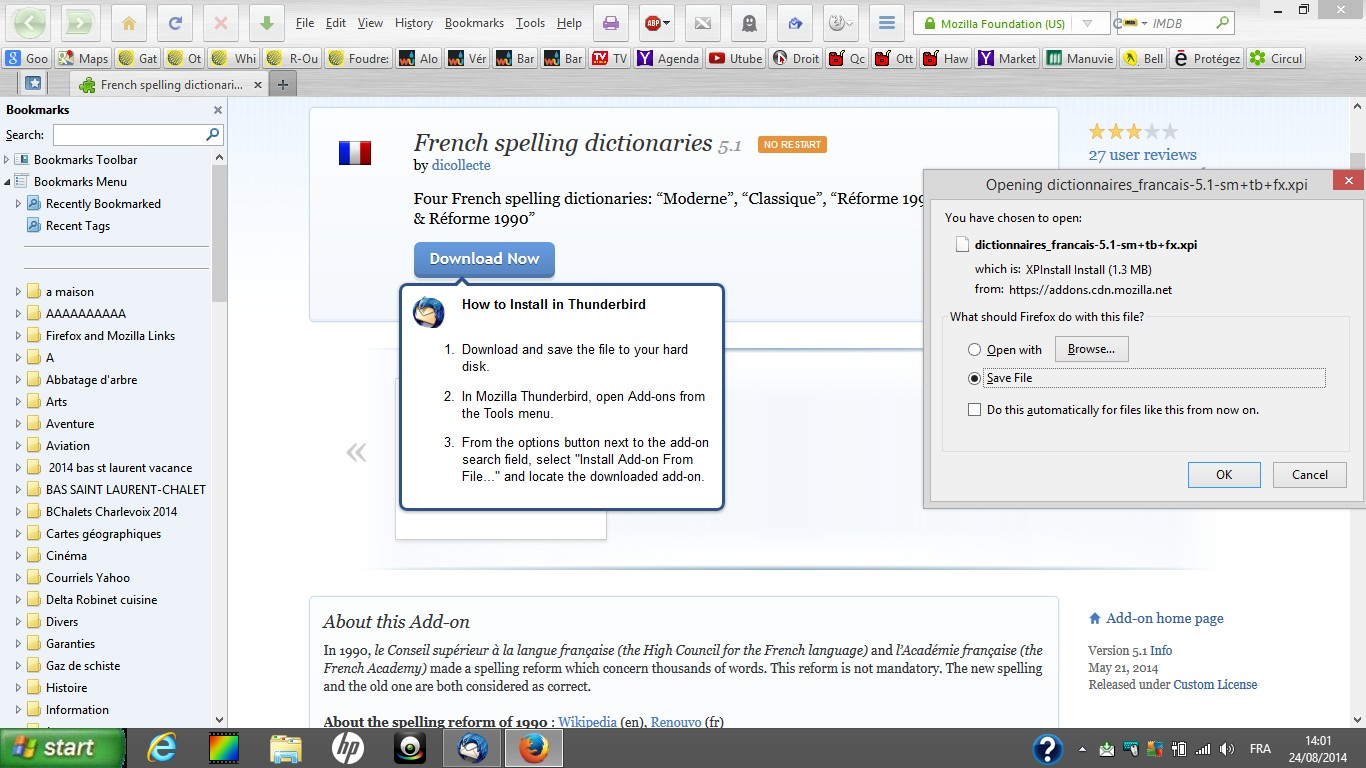

Here's the revised screen shot with the proper dictionary
