


Google Predictions Not Working In Google Search Box With Mozilla Firefox

At www.google.com, as I type in Google's search box, no predictions appear like they once did in Mozilla Firefox, but they appear when I use Internet Explorer. I have not done anything different to my computer to make this happen; it just stopped showing predictions.
I have researched and tried to do some fixes, but nothing seems to work. I have gone to Google's Search Settings and changed the preferences; I have uninstalled and then reinstalled Mozilla Firefox (and different versions); I have cleared the cache and cookies, but nothing seems to resolve the issue.
Any step-by-step instructions on how to fix this would be appreciated.
All Replies (13)
In the past you seem to have the about:home open in a tab. That page may look like a Google page as it has a Google image on it, but that page is a build-in page that only has a simple search bar without suggestions and no extras. Form fill however should remember what you've typed yourself. The real Google site uses autocomplete=off and as such doesn't remember what you type yourself.
- Tools > Options > Privacy > History: "Remember search and form history"
- https://support.mozilla.org/kb/Form+autocomplete
Cor-el, I did what you said "Tools > Options > Privacy > History: "Remember search and form history"", and it still isn't working.
My home page is definitely www.google.com. I just don't get it, it worked fine once before. And, like I said earlier, it works o.k. in Internet Explorer. Any other suggestions would be appreciated.
I'm adding to this post...it seems that something in general is wrong with Mozilla Firefox because now (or I'm just noticing now) when I go to different web sites, they don't seem to load properly (things are missing, etc.). When I go to the same web sites in Internet Explorer, they're good. Could Firefox be corrupted? I've removed Firefox and then reinstalled it, but that doesn't seem to fix anything.
Also, I now have Firefox 9.0.1.
Athraithe ag Sheshe123 ar
Can you attach another screenshot to verify that?
Use a compressed image type like PNG or JPG to save the screenshot and make sure that you do not exceed the maximum file size (1 MB).
I'm not sure what screenshot you want, but I'll assume it's for the last statement I made regarding Firefox 9.0.1; if that's not what you're looking for, just let me know. Thanks.
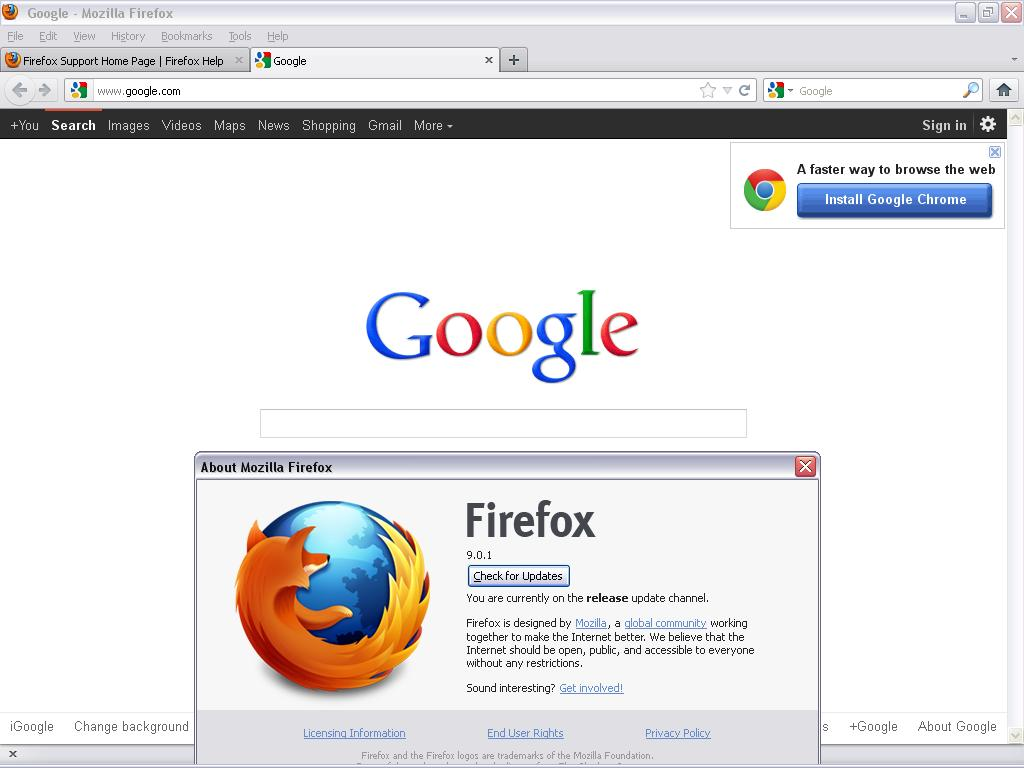
Yes, that is the Google site.
Clear the cache and the cookies from sites that cause problems.
"Clear the Cache":
- Tools > Options > Advanced > Network > Offline Storage (Cache): "Clear Now"
"Remove Cookies" from sites causing problems:
- Tools > Options > Privacy > Cookies: "Show Cookies"
Start Firefox in Use Troubleshoot Mode in Firefox to check if one of the extensions or if hardware acceleration is causing the problem (switch to the DEFAULT theme: Firefox (Tools) > Add-ons > Appearance/Themes).
- Don't make any changes on the Safe mode start window.
- https://support.mozilla.org/kb/Safe+Mode
Cor-el: I "cleared the cache" and "removed cookies", but still having problems with certain websites. And, also, Google predictions as I type still does not work.
I'm confused about what you're saying with Firefox Safe Mode. When I go to extensions, it says "You don't have any add-ons of this type installed. Learn more about add-ons." Also, I don't know what you mean regarding hardware accleration-what is that? And what should I be looking for in the way of problems.
Also, when you say "(switch to the DEFAULT theme: Firefox (Tools) > Add-ons > Appearance/Themes)", it won't let me when I'm in Safe Mode. By the way, that's the only thing in Appearance/Themes.
And, apparently, I don't think I have any add-ons because on the left side it has Get Add-ons, and when I click on it, it says "What Are Add-ons" and then has a whole introduction on it all.
Isn't there a way just to get Mozilla Firefox back to the way I once had it (~6 months ago)? Could Firefox be corrupt?
Which version of Firefox are you currently using?
The latest Firefox 3.6.25 release or do you have updated to Firefox 9.0.1 (Firefox 10 will be released tomorrow)?
Create a new profile as a test to check if your current profile is causing the problems.
See "Basic Troubleshooting: Make a new profile":
There may be extensions and plugins installed by default in a new profile, so check that in "Tools > Add-ons > Extensions & Plugins" in case there are still problems.
If that new profile works then you can transfer some files from the old profile to that new profile, but be careful not to copy corrupted files.
See:
Cor-el: I am currently using Firefox 9.0.1. Should I change it? _______________________________________________
I did as you stated and went to See "Basic Troubleshooting: Make a new profile": https://support.mozilla.org/kb/Basic+Troubleshooting#w_8-make-a-ew-profile
I created a new profile. And according to the article, it stated "If you have multiple profiles, Firefox prompts you for the profile to use each time you start Firefox.". But when I started Firefox, it did not prompt me to choose a profile. And, also, the new profile folder it created in my C:\ drive was empty, but the other default folder still has items in it.
Also, when I go to "Tools > Add-ons", nothing has changed in Get Add-ons, Extensions, Appearance, or Plug-ins".
And, after all this, the problem is not solved.
Isn't there a way to just totally start over with Mozilla Firefox? ____________________________________________ I'm adding to this post a few hours later... It seems that this problem is deeper than Mozilla Firefox. Now (or at least I'm just now noticing), Internet Explorer is having an issue with something. My System Restore is not working correctly. And my Recycle Bin keeps showing 'WINDOWS' in it...so I have no idea what to do next. ________________________________________ Adding to this post...2/2/12: I just updated to FF 10.0, but still having the same issues.
Athraithe ag Sheshe123 ar
Still having some issues with Mozilla Firefox, but I just noticed today-that if a go to the address bar and type "https://www.google.com" then the predictions work. But if I just type "www.google.com" then the predictions do not work. I know I never had to do that in the past so why do I have to now and what causes this?
You may have security software (firewall) that is suppressing the Google suggestions and doesn't see them if there is a secure connection.
Cor-el: Where do I find those settings exactly and how do I change them? Thanks.
Which security software (firewall, anti-virus) do you have?
Remove all rules for Firefox and the plugin-container from the permissions list in the firewall and let your firewall ask again for permission to get full unrestricted access to internet for Firefox and the plugin-container process and the updater process.
See:
I have Avira. I'll take a look at the links you posted. Thanks.
I just looked at the first link you sent and when I went to "How can I unblock an application in Avira Firewall", it does not have a "Firewall +" (Click on the plus sign next to Firewall, to expand the Firewall menu and click on Application rules.) for me to change anything - maybe it's because I don't have Avira Premium Security Suite - what do you think?
Athraithe ag Sheshe123 ar