


Unified Folders - Wrond "Sent"

Have recently upgraded to 156.0 and I find that the "Sent" folder in the Unified Folders shows the wrong folders. They are the same as the "Inbox" folder as you can see in the attached photo. What do I need to do to correct this?
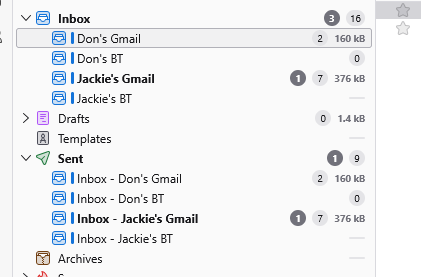
All Replies (7)
When you go into account settings and look as the sent setup, is it set to send copies to the inbox on those accounts?
Hi Matt,
Thanks for getting back to me. Have attached what it says.
Don
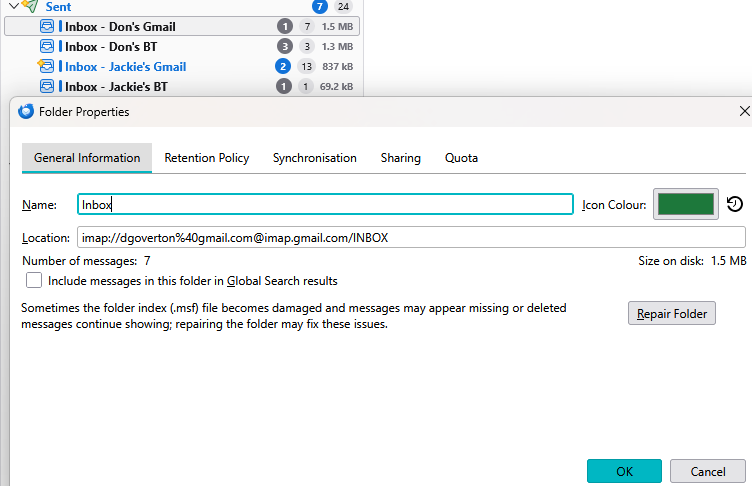
you account settings look like this
 These are the properties of the folder you selected. Not your account settings.
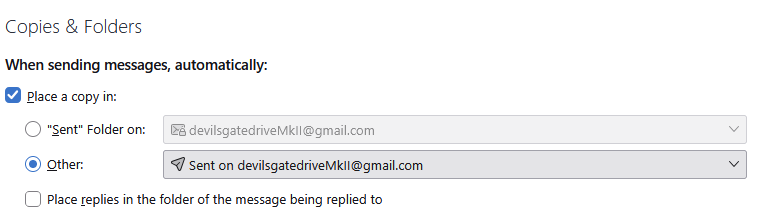
Matt, thank you. I attach how my Copies are set us. They are set up exactly the same as my laptop and that does not have the peculiar "Sent" folder with my Inbox folders.
Don
Then I suggest we try a forced rebuild.
Open the profile you are using (there is an open button the the troubleshooting information on the help menu beside the Profile folder entry in Troubleshooting information. I recommend using this button even if you think your know what profile is in use.
close down Thunderbird (it may even be a good idea to ensure there is no Thunderbird process showing in task manager before the next step.) Delete the folder smart mailboxes from in the mail folder of the profile Start Thunderbird again and that will initiate the complete rebuilt of the unified folders in Thunderbird. Hopefully that fixes it as the sent folder is not pointing to the inbox folder.
Hi Matt,
I followed your instructions. I closed Thunderbird, deleted the smart mailboxes (Mail then smart mailboxes) and also restarted my computer. I then opened Thunderbird and the problems persists - see the attached.
Willing to try anything, if you have any suggestions!
Many thanks,
Dopn
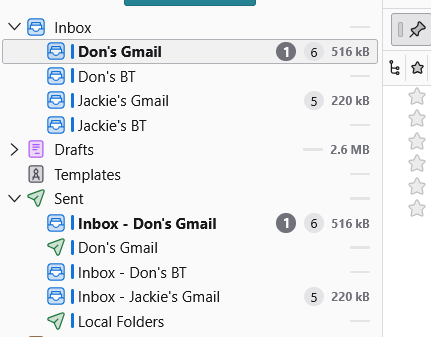
Hi Matt,
Have just upgraded top 156.0 on my laptop and I now have to same problem as my desktop!
Perhaps it is something to do with the setup in 156.0?
Don