


cannot write & edit/highlight/change text colours etc before sendinge email using firefox browser

when i use Chrome or edge to access yahoo email I can write & edit. when using Firefox browser; I cannot write & edit/highlight/change text colours etc before sending. tried deleteing & re-installing Firefox . please help. Driving me crazy rsvp
All Replies (13)
I haven't seen any similar reports (besides the seven other duplicates you've filed) so this might be only something local.
Here are some standard troubleshooting steps that may resolve the issue:
- Start with clearing Firefox cache.
- If it does not help, try clearing cookies and data for the website you experience troubles with (warning: you will be logged out on this website).
- If it also does not help, try running Firefox in Troubleshoot Mode. If the problem doesn't persist, please follow the steps from this article to troubleshoot further.
- If nothing from the above helps, try creating a new Firefox profile and check if the issue persists there. If it doesn't, you can start copying files from your old profile to the new one to identify which one causes the issue. See this article on what files to copy.
Hi tried these steps. still no change, when i write an email; i cannot edit/highlight/chnage text colours etc. If i log into yahoo mail via Edge or Chrome; i can edit email fine. Has mozilla changed firefox browser/email edit setttings>? If you can edit then which browser do you use to access Yahoo mail??? rsvp PS; i am using OPERA browser . that works ok. Chrome & edge both al;so work ok. Just pain thar forefox does not. all browsers have thioer own wierd settig systems. I am well used to firefiox & prefer to continue using firefox.
No, no change. And no reports from anyone else anywhere, sorry, this is puzzling. When you say you can't edit — does it mean the editor still works and you can type, you just don't see your cursor or words selected when going back, but you can still type — or the whole input stops to write anything?
Could you try with some similar editors below, and see if these all type, edit, drag, highlight and format as you'd expect?
hello & thanks so far The same issue applies when i log into yahoo email using firefox browser across my other devices/laptops etc. when writing email; I highlight any text to edit. it can be made bold but no other edit possible. when i use differtent browser to access yahoo email; then editor works., This is a firefox issue. I will try totally deleting firefox & re-installing .i saved my bookmarks on seperate disk. I thought perhaps some setting added extension was cause. If others are not getting then maybe full deletion/re-install firefox browser without any addons amy help/ where is the "Run firefox in Basic mode"?
PS; cannot take screenshot whilst writing email & trying to edit cannot upload a video of issue/ only images
It's in menu: Help › Troubleshoot Mode…
Hi where is this help .? & trouble shoot
in settings?
rsvp
kraindi said
Hi where is this help .? & trouble shoot in settings?
https://support.mozilla.org/en-US/kb/diagnose-firefox-issues-using-troubleshoot-mode
Ok; Tried Trouble shooting Firefiox but same problems. this is firefix iossue as same issues across my other devices. opeing on troiuble shoot mode made no difference. Using different browsers then no problems. its just that i got used to Firefiox. ages to setup bookmarks & now this. I pay microsoft & Yahoo fees . Firefox is/was good but the email edit is not good any longer.
It's still not clear whether you can't type/edit in the rich text editor, or just don't see the highlight. Or if that's Yahoo–specific only.
So trying to ask again:
When you say you can't edit — does it mean the editor still works and you can type, you just don't see your cursor or words selected when going back, but you can still type — or the whole input stops to write anything? Could you try with some similar editors below, and see if these all type, edit, drag, highlight and format as you'd expect?
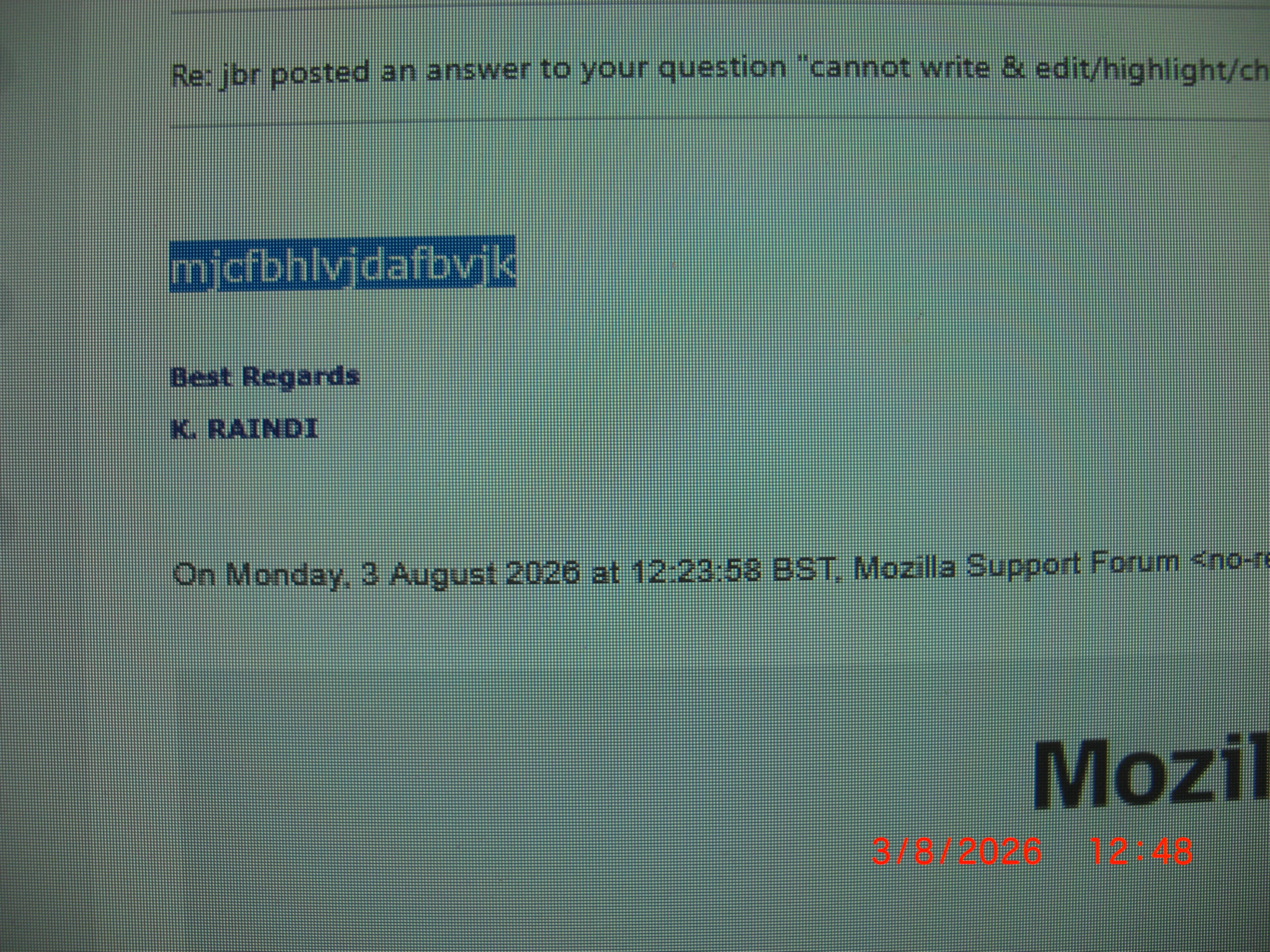
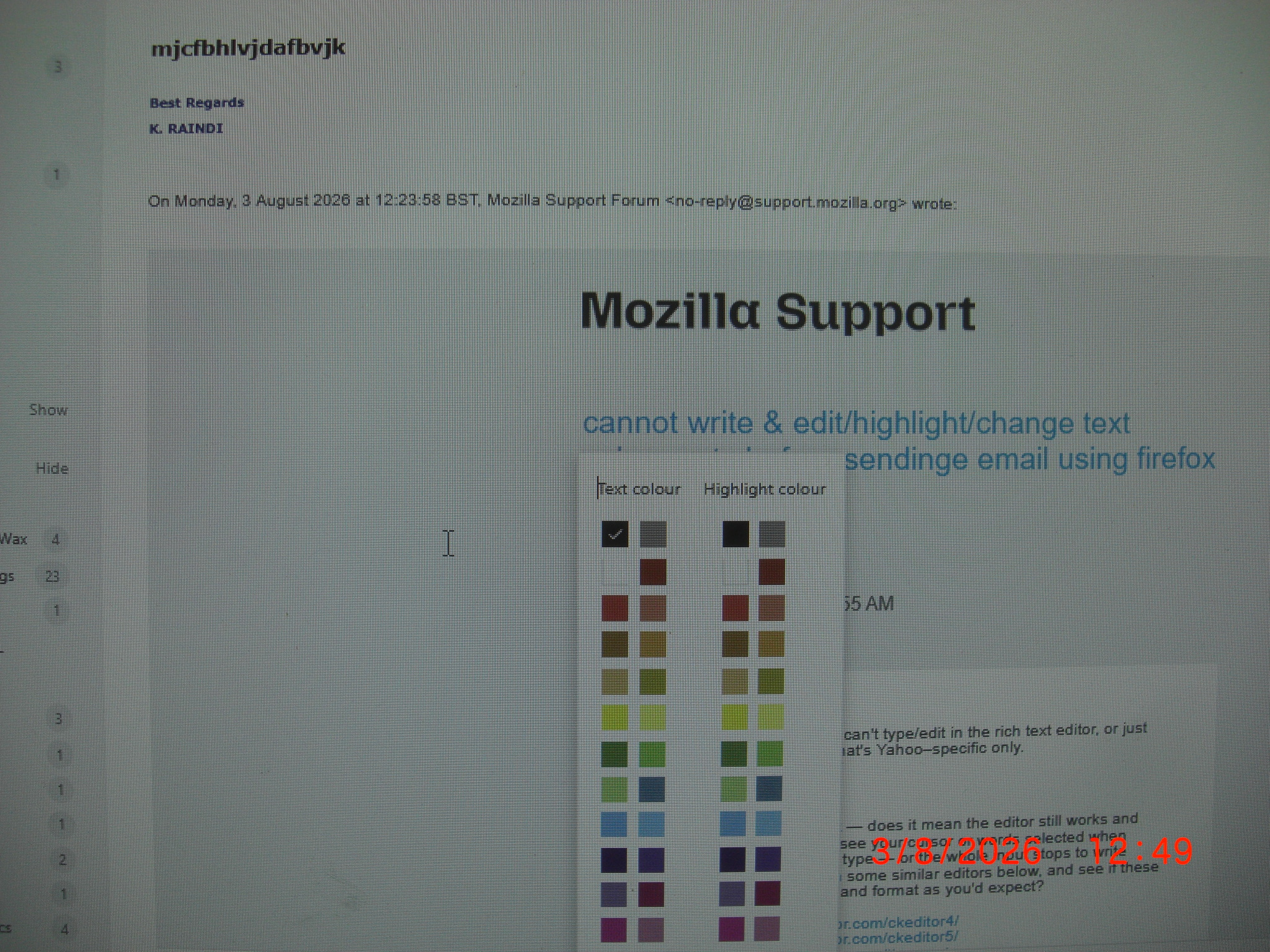
hi I write an emai to anyone. or reply to email/same thread etc. Just lke everyone else. when i highlight text with curcor then try to edit /chnage text colour/font size etc; the cursor/highlit dissappears & i cannot edit the text . I can make lettering bold when highlited. see pics attached. 1 shows text highlit. 2nd shows higlight dissapears when i try to chnage text colour. rsvp
And all of these three editor examples below work for you as expected?
- https://www.iloveeditor.com/ckeditor4/
- https://www.iloveeditor.com/ckeditor5/
- https://www.iloveeditor.com/tinymce/
— you can type, edit, change fonts etc. as you want on every single one of these 3 links?
none worked. Its A firefox browser issue. same across all my devices. I now use alternative browsers to access Yahoo mail.

Since Yahoo Mail works normally in Chrome and Edge, but the compose/editing features fail only in Firefox, this sounds more like a Firefox setting, extension, or site-data issue than a problem with your Yahoo account.
I'd try these in this order:
1. Open Yahoo Mail in a Firefox Private Window and test Compose. If it works there, an extension or stored site setting is probably causing the problem. 2. Temporarily disable Firefox extensions, especially ad blockers/privacy extensions. Yahoo notes that third-party browser extensions can interfere with Yahoo Mail. 3. Make sure JavaScript is enabled in Firefox, since Yahoo Mail relies on it for its web interface. 4. In the Yahoo compose window, check that you're using **Rich Text** rather than Plain Text. Yahoo's formatting toolbar is only available when composing in Rich Text. 5. Clear the site data/cache for Yahoo Mail and sign in again. 6. Make sure Firefox is fully updated.
There have also been Firefox/Yahoo compatibility issues in the past involving the compose editor and formatting controls, so if everything works in Chrome/Edge but consistently fails in Firefox, it could be a browser compatibility issue rather than something you're doing wrong.
If you can, try the Private Window test first. That's probably the quickest way to determine whether an extension or Firefox profile setting is responsible.
Athraithe ag Tony Stark ar