


Email will not send.

Email will not send. Message-- "Sending of the message failed. An error occurred while sending mail. The mail server responded: Email rejected. Please verify that your email address is correct in your account settings and try again." I am not sending to another person but testing with my personal email. Thank you.
Athraithe ag christ1 ar
Réiteach roghnaithe
Carolyn Krammes said
yes, I am using an app password.
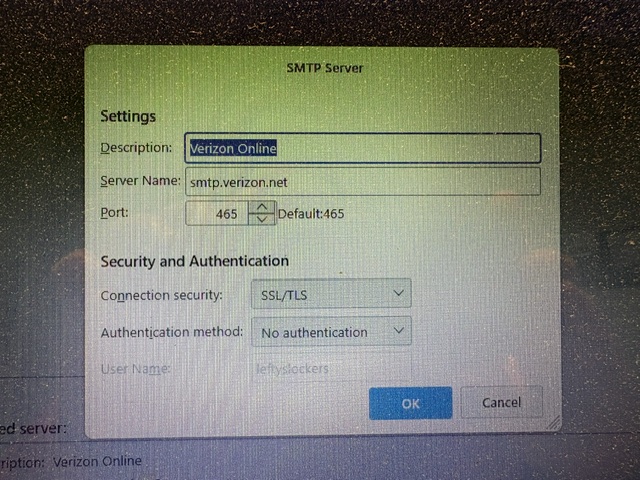
No you are not using one to send mail and that is the problem. You are trying to send mail without any form of authentication and the server is refusing.
All Replies (10)
Please post screenshot of server settings pane and SMTP server settings pane. My guess is the email addresses aren't the same. OR, that you did not insert complete email address in both..
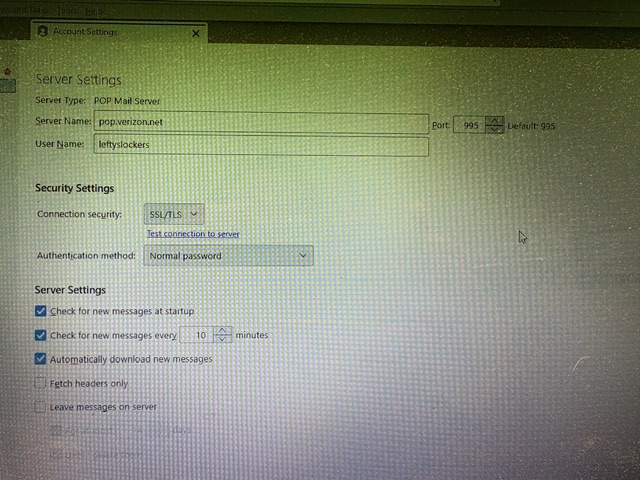
thank you. for user name, enter full email address in both setups, not just the part to the left of @ I think that will fix the problem. Let me know. thank you
I was able to edit the User Name in the server setup which did nothing -same error message . In the SMTP setup, I am not sure where to enter the full email address.
In the outgoing server pane, there is an area for user name but it is grayed out and I can't edit.
The authentication method for verizon is normal password. Once you set that you will get an opportunity to tell the server what your username is. Until then it does not care because you are not authenticated.
Note this is a Verizon (AOL/Yahoo account) and you will need to use an app password with Thunderbird, not you account password. I assume you are using one on the incoming account and the same one can be used to send mail. If you do not know what that password being used is, opening the password manager gives you to opportunity to look at what Thunderbird is using. See https://support.mozilla.org/en-US/kb/password-manager-remember-delete-change-tb
Réiteach Roghnaithe
Carolyn Krammes said
yes, I am using an app password.
No you are not using one to send mail and that is the problem. You are trying to send mail without any form of authentication and the server is refusing.
Thank you. When I looked at the screenshot again after your reply I saw it. I did a test outgoing email and it worked.

you undated the mail program and now it won't recieve mail and the problme with sending is not fixed yet I have not change the settings IT all us to work fine till windows 11 pro took over the computer.