


Lost access to many mail folders and emails on my Windows 10 laptop!

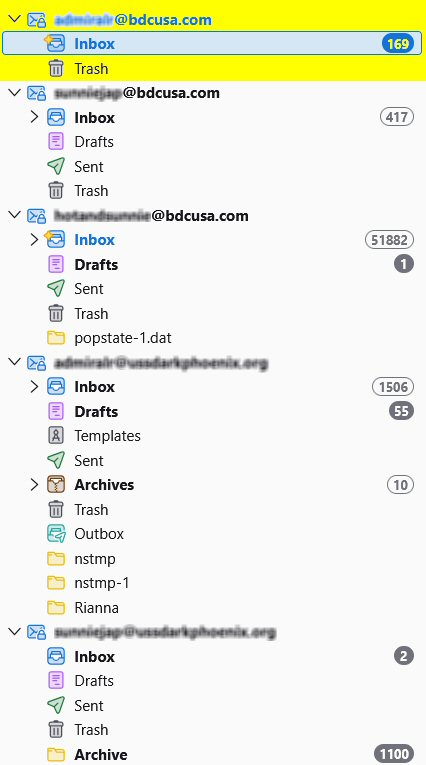
Since April 9, 6:14 PM CDT, most folders (e.g., Drafts, Templates, Sent) on my primary laptop in my primary POP email account, [edited]@bdcusa.com, have disappeared; and ALL SUBfolders in my Inbox have disappeared. Over 185,000 emails have vanished overnight!
On my primary laptop, I'm using Thunderbird 149.0.1 (64-bit) on the release update channel, still running 64-bit Windows 10 Professional, and have nothing backed up to the cloud.
Fortunately, on my secondary laptop, I'm using Thunderbird 115.18.0 (32-bit) on the esr update channel, running 32-bit Windows 7 Professional. I say, "fortunately," because ALL folders and emails are still there, so I know they haven't been vaporized!
How do I return all folders and emails for this email account to visibility and access on my primary laptop? Detailed directions appreciated.
Athraithe ag christ1 ar
All Replies (2)
It's now been 2 weeks without a useful answer, much less a solution. So let me ask a "workaround" question:
How could I easily, efficiently, and safely copy the contents of entire folders from one computer to a destination computer without damaging/deleting items already in those folders on the destination computer?
Thank you.