


Firefox opens gmail account page and logs in without password!

This happens occasionally for many months. It is still happening on v147.0.1. I start the computer, open Firefox, and the browser loads previously viewed pages, including my Gmail account. The Gmail page has me already logged in, and I DID NOT provide my password! This has to be a big security risk. If some one were to use my computer, or it was stolen, they would have complete access to my Gmail and all Google properties! OS - Debian GNU/Linux 12 (bookworm) Kernel v6.1.0-42-amd64 Firefox v147.0.1 (and MANY previous versions)
All Replies (3)

Yes, because Firefox expects that sufficient security is implemented when you are required to know the password to login to the computer. If you don't have a (strong) password for the computer, then ignoring Firefox for a moment, anybody who gets the computer can gain complete access to all of your applications and files. The point is that if you know the password, then that confirms your identity as the owner of the computer, so Firefox is going to resume its session. So, I don't really understand your concern.
If you don't want Firefox to load previously viewed pages, then you can make sure "Open previous windows and tabs" is unselected in Firefox settings. If you don't want Firefox to keep login states, that you can set the preference that clears cookies and site data when Firefox is closed. You can even require a password to manage the passwords in Firefox's password manager. But all of this isn't as important as the first paragraph.
Logging in to the computer does not give Firefox permission to log in to my gmail account. Also, this only happens occasionally. Not only with the gmail page but other previously viewed pages. "Open previous windows and tabs" is not selected. I do not use a password manager.

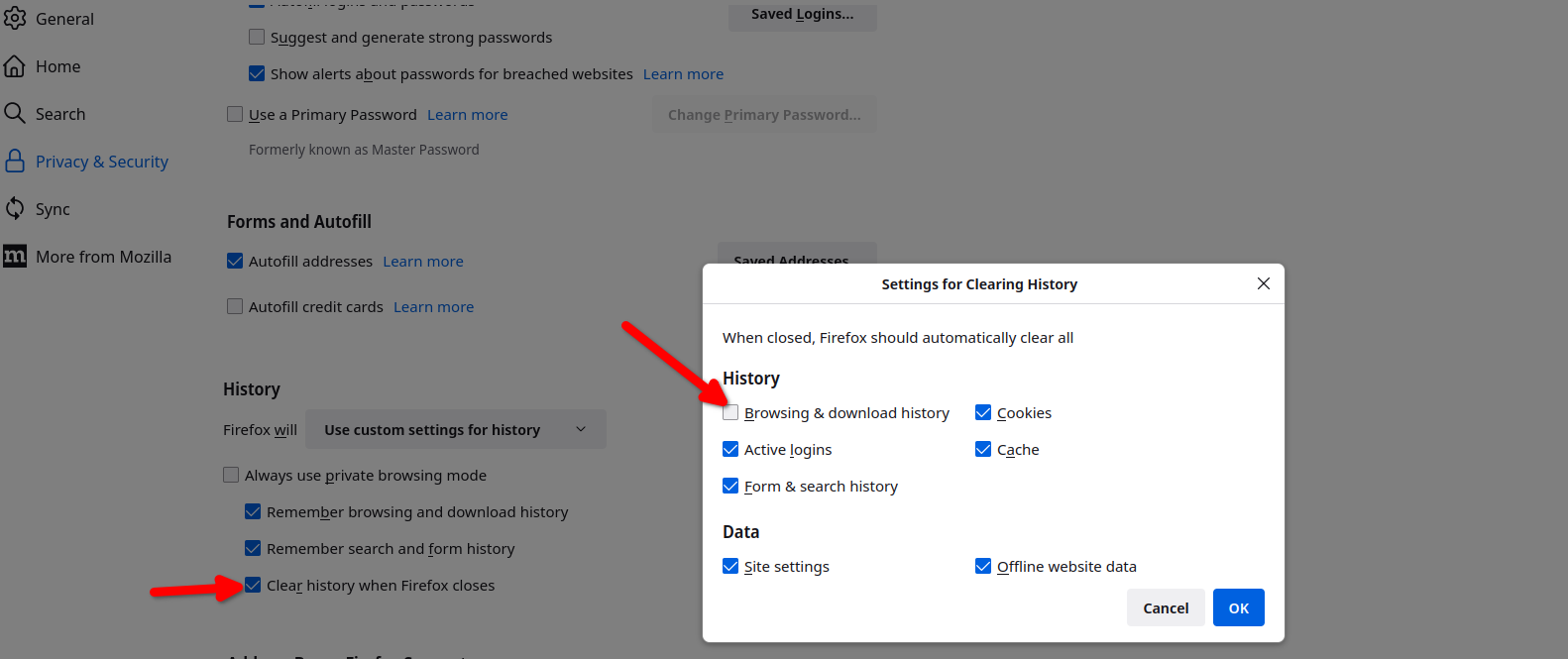
The issue is what do you have Firefox doing when you close the browser. see screenshot You can see from my screenshot that I have Firefox erase cookies, cache, and active logins so that when the browser is reopened I have to login into all the sites. I do want my previous windows and tabs to open which is why that option is not checked.
Athraithe ag jonzn4SUSE ar