


Problem loading popular websites e.g. eBay (tried a new "profile" for troubleshooting)

Hi!
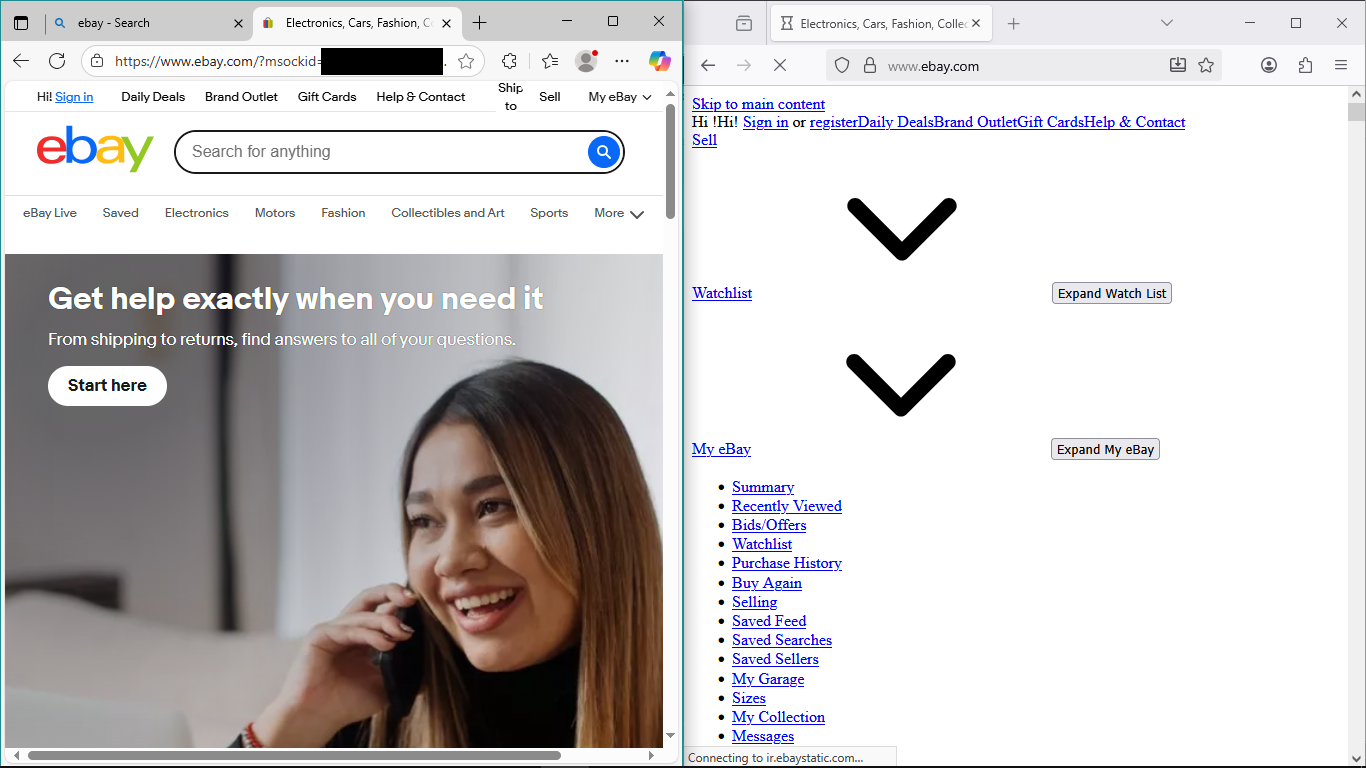
Please see attached image:
Left: Edge (making sure it isn't a network issue)
Right: Firefox using a new profile from about:profiles.
On my main profile, I've tried clearing the data and cookies (though not the history) a couple of weeks back.
Any suggestions welcomed! Many thanks in advance.
All Replies (9)

Are you running any third-party security software, VPNs, adblockers, etc? Might be a good idea to try temporarily disabling them if so.
t.r.ernst said
Are you running any third-party security software, VPNs, adblockers, etc? Might be a good idea to try temporarily disabling them if so.
I am using an ad-blocker but I've already tested the troubleshooting mode and a brand new profile, both options disable everything, right? Thanks.
Athraithe ag Joey ar
Not suggesting you should, but have you made any changes to about:config in the past?
Paul said
Not suggesting you should, but have you made any changes to about:config in the past?
Just the `browser.chrome.toolbar_tips` to false; just tested putting it back to true.
The other modified entries aren't a lot and seems to be automated stuff, e.g. `toolkit.telemetry.cachedClientID`.
Are you using Adblocker Ultimate by any chance?
Hi
So that this can be looked into further:
- Open Firefox
- Open a new tab and type in “about:logging” into the URL bar.
- Set the "Logging preset" to "Networking"
- Select "Logging to a file" and note the path to the log file.
- Click on "Start Logging".
- Reproduce the issue (i.e. go to the web site that is broken for you and make the bug happen in the browser)
- Click on "Stop Logging".
- Provide the link or dump files to the Firefox developers via email to necko@mozilla.com
Thank you for your help.
Thank you for your help.